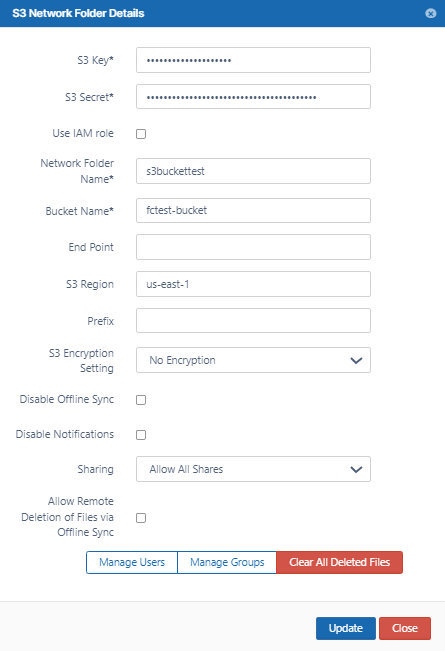
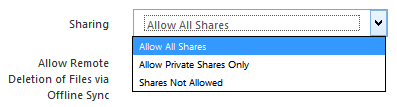
Sharing the content of the network share can be disabled or enabled using this option
Allow Remote Deletion of Files
via Offline Sync
Enabling this function will allow deleting files in the S3 Bucket if the files are deleted in the synced client. By default deletes are not propagated to S3 bucket when deleted via Sync client.
Disable notifications for Amazon S3 Network Folders
Create a LAN-Based Network Folder
By default, notifications are enabled for network folders. This means that all users who have access to a network folder and have notifications enabled receive notifications about all actions on the folder.
However, since multiple users may have access to the same network folder, users may receive notifications about actions that don't interest or don't apply to them.
There are various ways you can limit their access to these notifications. First disable notifications for the folder, and then override the setting only for notifications that you want to permit.
Disable notifications for the folder:
Click Network Folders in the left navigation menu to display the list of network folders
Click the Edit button for the network folder. The Network Folder Details dialog box opens.
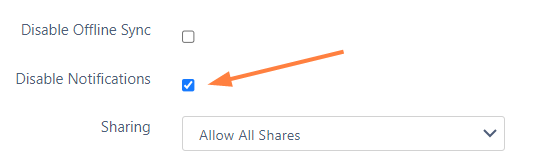
Check the Disable Notifications box.
Click Update.
Do one of the following:
Leave all notifications about actions in the folder disabled. By default, admins and users can override this setting. An admin can enable notifications about the folder for specific users, or users can enable their own notifications for the folder. If you do not want users to be able to override this setting, you must disable file change notifications in Settings > Misc > Notifications. See Notifications for File Changes for help.
Enable notifications about the folder for specific users. This is useful if you want to limit the users who receive notifications about a network folder to those you have shared it with. See the various options for setting users' notifications in the section Managing User-Defined Notifications.
Allow users to enable their own notifications about the folder. See the options users have for setting their own notifications in the section Notifications.
JavaScript errors detected
Please note, these errors can depend on your browser setup.
If this problem persists, please contact our support.