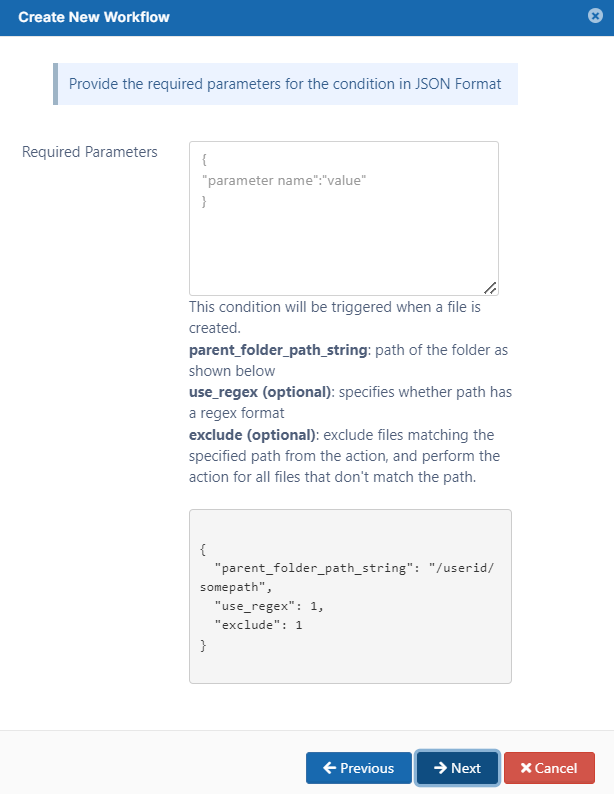
This condition will be triggered if a file is created via any means (Browser, Clients, etc.)
parent_folder_path_string - required as a parameter for this condition to trigger. If the condition needs to be triggered for all folders, then you can set it to be "/". For help specifying the path correctly, see Identifying a FileCloud Specific Path.
use_regex (optional) - specifies how the folder path is validated.
0 or unspecified = use an exact match for the parent folder path string
1 = use a regular expression match for the parent folder path string
exclude (optional) - specifies the system should only perform the action on non-matching paths (do not perform the action on matching paths).
This condition will be triggered if a file is updated.
parent_folder_path_string - required as a parameter for this condition to trigger. If the condition needs to be triggered for all folders, then you can set it to be "/". For help specifying the path correctly, see Identifying a FileCloud Specific Path.
use_regex (optional) - specifies how the folder path is validated.
0 or unspecified = use an exact match for the parent folder path string
1 = use a regular expression match for the parent folder path string
exclude (optional) - specifies the system should only perform the action on non-matching paths (do not perform the action on matching paths).
This condition will be triggered if a file is deleted.
parent_folder_path_string - required as a parameter for this condition to trigger. If the condition needs to be triggered for all folders, then you can set it to be "/". For help specifying the path correctly, see Identifying a FileCloud Specific Path.
use_regex (optional) - specifies how the folder path is validated.
0 or unspecified = use an exact match for the parent folder path string
1 = use a regular expression match for the parent folder path string
exclude (optional) - specifies the system should only perform the action on non-matching paths (do not perform the action on matching paths).
This condition will be triggered if a file is downloaded
parent_folder_path_string - required as a parameter for this condition to trigger. If the condition needs to be triggered for all folders, then you can set it to be "/". For help specifying the path correctly, see Identifying a FileCloud Specific Path.
use_regex (optional) - specifies how the folder path is validated.
0 or unspecified = use an exact match for the parent folder path string
1 = use a regular expression match for the parent folder path string
exclude (optional) - specifies the system should only perform the action on non-matching paths (do not perform the action on matching paths).
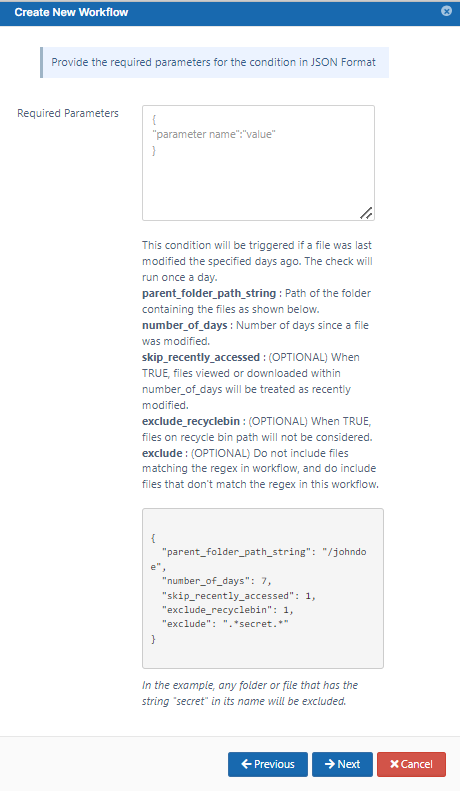
This condition will be triggered if a file is not updated for specified number of days.
This is useful for removing old files that are no longer being used
This check will run once a day
parent_folder_path_string - required as a parameter for this condition to trigger.
If the condition needs to be triggered for all folders, then you can set it to be "/". For help specifying the path correctly, see Identifying a FileCloud Specific Path.
NOTE: ONLY Managed storage paths are supported for this condition.
number_of_days - required to specify the number of days before the current date that a file was last modified.
This will be checked once a day and all files that match this condition will be subject to the THEN action you choose.
For example, if you specify the number of days as 15, all files in the specified folder that have not been modified in the last 15 days will subject to the the THEN action you configure.
skip_recently_accessed - required to specify whether files that were viewed or downloaded during the number of days are considered modified. Default is false, viewed or downloaded files are not considered recently modified. When true, files viewed or downloaded within number_of_days are considered modified and will not be included in the Then action.
exclude_recyclebin- (added in FileCloud version 21.3) optional (default is false) When true, files in recycle bin are not considered.
exclude - (added in FileCloud version 22.1) optional - specifies the system should only perform the action on non-matching paths (do not perform the action on matching paths).
This condition will be triggered if a file is added or updated
parent_folder_path_string - required as a parameter for this condition to trigger. If the condition needs to be triggered for all folders, then you can set it to be "/". For help specifying the path correctly, see Identifying a FileCloud Specific Path.
use_regex (optional) - specifies how the folder path is validated.
0 or unspecified = use an exact match for the parent folder path string
1 = use a regular expression match for the parent folder path string
exclude (optional) - specifies the system should only perform the action on non-matching paths (do not perform the action on matching paths).
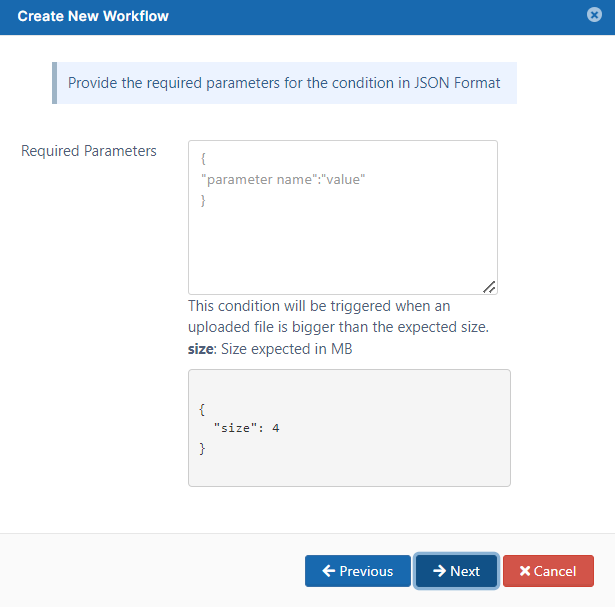
If the file uploaded is bigger than the expected size
Workflow Condition
Parameters
Description
If the file uploaded is bigger than expected size.
{ "size":"4" }
This condition will be triggered when an uploaded file is bigger than the size specified.
size- specifies the maximum expected file size in MB.
If the file downloaded is bigger than the expected size
Workflow Condition
Parameters
Description
If the file downloaded is bigger than expected size.
{ "size":"4" }
This condition will be triggered when a downloaded file is bigger than the size specified.
size- specifies the maximum expected file size in MB.
This condition will be triggered when a folder is created in the system
parent_folder_path_string - required as a parameter for this condition to trigger. If the condition needs to be triggered for all folders, then you can set it to be "/". For help specifying the path correctly, see Identifying a FileCloud Specific Path.
use_regex (optional) - specifies whether system uses an exact match for the parent folder path string ("use_regex": "0" or missing) or whether to use a regular expression match ("use_regex":"1")
exclude (optional) - specifies the system should only perform the action on non-matching paths (do not perform the action on matching paths).
This condition will be triggered when a folder is deleted
parent_folder_path_string - required as a parameter for this condition to trigger. If the condition needs to be triggered for all folders, then you can set it to be "/". For help specifying the path correctly, see Identifying a FileCloud Specific Path.
use_regex (optional) - specifies whether system uses an exact match for the parent folder path string ("use_regex": "0" or missing) or whether to use a regular expression match ("use_regex":"1")
exclude (optional) - specifies the system should only perform the action on non-matching paths (do not perform the action on matching paths).
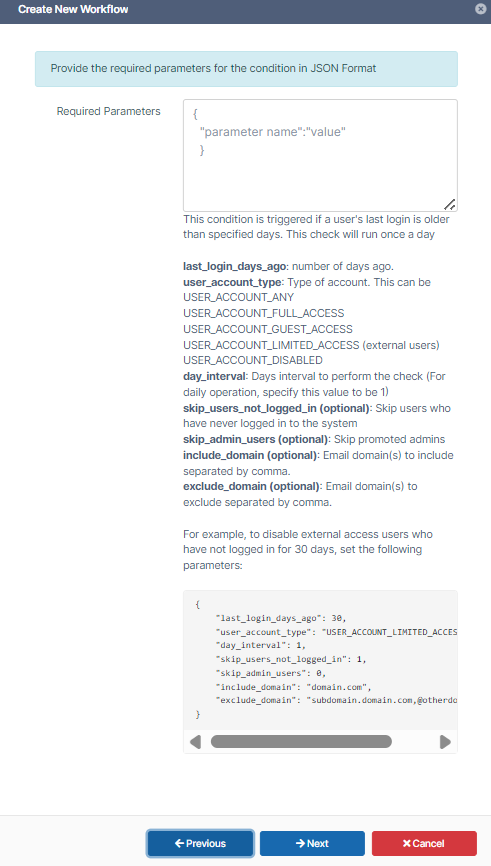
For example, every five days to check for full access users who have not logged in for the last 30 days. Omit them from this check if they have never logged in or are promoted admins.
If a user's last login is older than the specified number of days, then the THEN condition you configure will be run. last_login_days_ago: last login of a user account in number of days ago. user_account_type - type of account. You must use one of the following values:
USER_ACCOUNT_ANY
USER_ACCOUNT_FULL_ACCESS
USER_ACCOUNT_GUEST_ACCESS
USER_ACCOUNT_LIMITED_ACCESS (for external users)
USER_ACCOUNT_DISABLED
day_interval - the number of days between checks
For daily operation, specify a value of 1
skip_users_not_logged_in(optional): Skip users who have never logged in to the system. This enables you to only apply the action to users who are already using the system. Values are true and false.
skip_admin_users (added in FileCloud 23.251) Optional. Do not include promoted admins. 0 (default) - Include promoted admins 1 - Do not included promoted admins
include_domain - Optional. If the user's email domain matches one of the domains listed here, the condition applies.
exclude_domain - Optional. If the user's email matches one of the domains listed here, the condition does not apply.
If a new user is created
Workflow Condition
Parameters
Description
If a new user is created ...
None
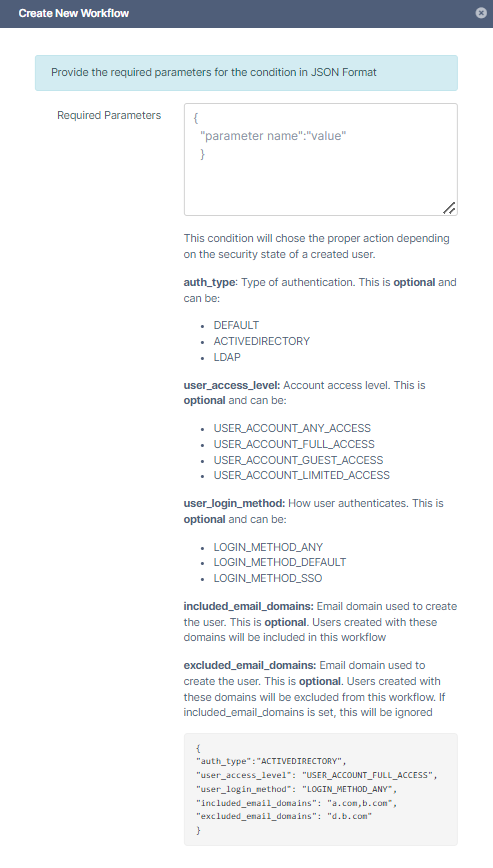
When a new user account is created, the THEN action you configure will be triggered.
Optional Parameters
auth-type - Type of authentication. This isoptionaland can be:
DEFAULT
ACTIVEDIRECTORY
LDAP
user_access_level:Account access level. This isoptionaland can be:
USER_ACCOUNT_ANY_ACCESS
USER_ACCOUNT_FULL_ACCESS
USER_ACCOUNT_GUEST_ACCESS
USER_ACCOUNT_LIMITED_ACCESS (for external users)
user_login_method:How user authenticates. This isoptionaland can be:
LOGIN_METHOD_ANY
LOGIN_METHOD_DEFAULT
LOGIN_METHOD_SSO
included_email_domains: (Available in FileCloud 23.242 and later) Email domain used to create the user. This is optional.Only If the new user has any of these domains, the workflow is triggered.
excluded_email_domains: (Available in FileCloud 21.2 and later) Email domain used to create the user. This isoptional. If the new user has any of these domains, the workflow is not triggered. If included_email_domains is set, this parameter is ignored.
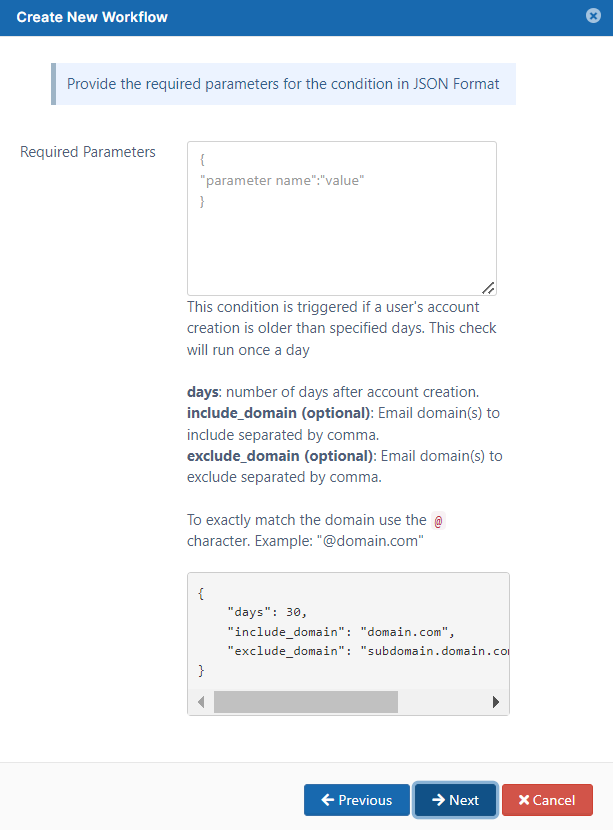
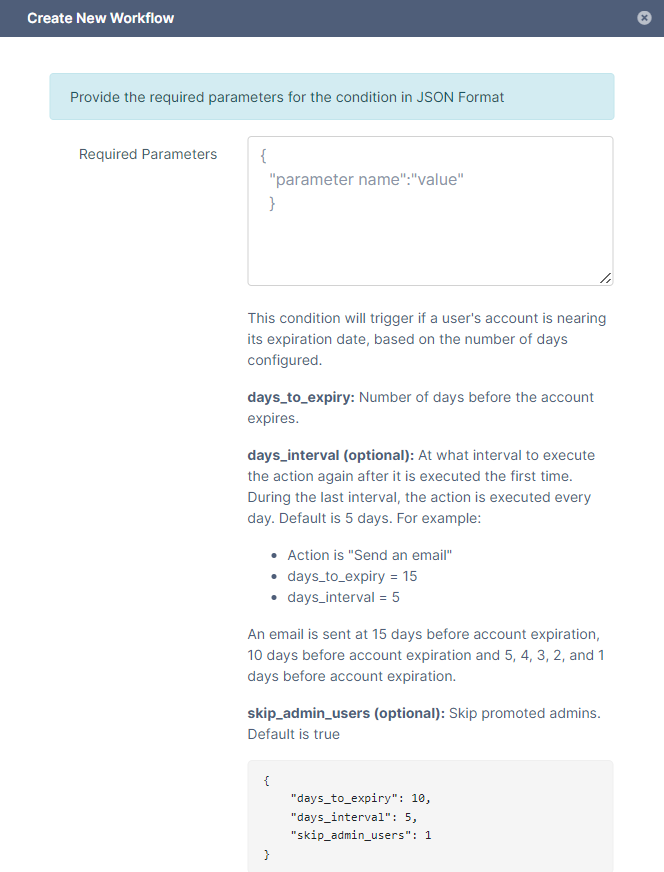
For example, When a user's account is set to expire in 15 days, perform an action such as sending the user an email. Send the email again every 5 days, but the last 5 days, send the email every day. Do not perform the action on promoted admins.
days_to_expiry - Number of days before account expiration
days_interval - (optional)
At what interval to perform the action again after it is performed the first time. During the last interval, the action is performed every day. Default is 5 days. For example:
Action is "Send an email"
days_to_expiry = 15
days_interval = 5
An email is sent at 15 days before account expiration, 10 days before account expiration and 5, 4, 3, 2, and 1 days before account expiration.
skip_admin_users Optional. Do not include promoted admins. 0 (default) - Include promoted admins 1 - Do not included promoted admins
This condition will be triggered when a comment is added
parent_folder_path_string - required as a parameter for this condition to trigger. If the condition needs to be triggered for all folders, then you can set it to be "/". For help specifying the path correctly, see Identifying a FileCloud Specific Path.
use_regex (optional) - specifies whether system uses an exact match for the parent folder path string ("use_regex": "0" or missing) or whether to use a regular expression match ("use_regex":"1")
exclude (optional) - specifies the system should only perform the action on non-matching paths (do not perform the action on matching paths).
Perform an action periodically at specified time and interval
Workflow Condition
Parameters
Description
Perform an action periodically at specified time and interval
{ "time_string":"16:45:05", "day_interval":"7" }
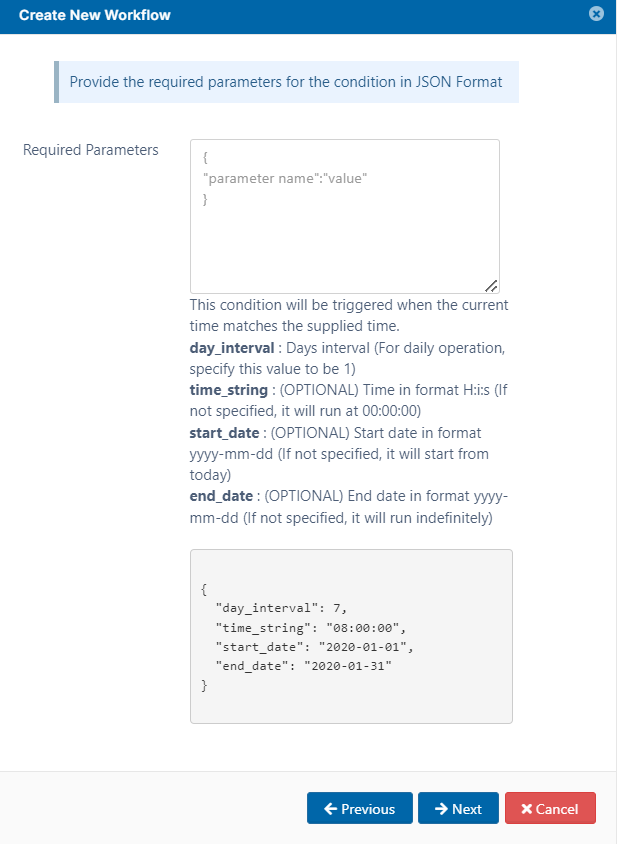
This condition will be triggered when the current time on the FileCloud Server matches the supplied time.
day_interval - number of days that passes after a THEN action before it is triggered again.
The THEN action you choose will be triggered every "day_interval" days.
If the "day_interval" is 1, it is done daily
time_string - the time of day when you want the THEN action triggered
The matching time includes the time zone
The time is specified in a 24-hour format of Hours, minutes, seconds
start-date - Date that FileCloud begins checking for the condition
end-date - Last date that FileCloud checks for the condition.
Perform an action on the specified date
Workflow Condition
Parameters
Description
Perform an action on the specified date
{ "date_string":"2020-01-11" }
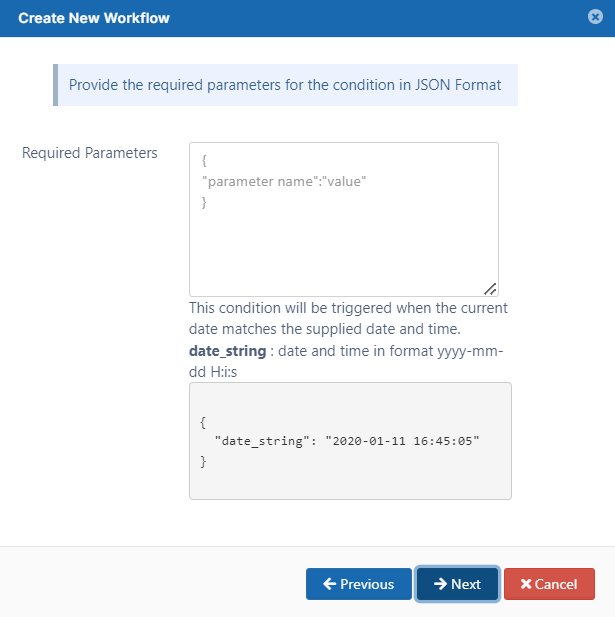
When the date matches the supplied date and time, the THEN action you configure will be run.
date_string - date and time in a 24-hour format
yyyy-mm-dd H:i:s
Perform an action periodically
Workflow Condition
Parameters
Description
Perform an action periodically
None. The frequency depends on how you configure the cron or task scheduler frequency.
This requires you to set up one of the following:
cron job
task scheduler
If share has not been accessed for specified days
Workflow Condition
Parameters
Description
If a share has not been accessed for specified days
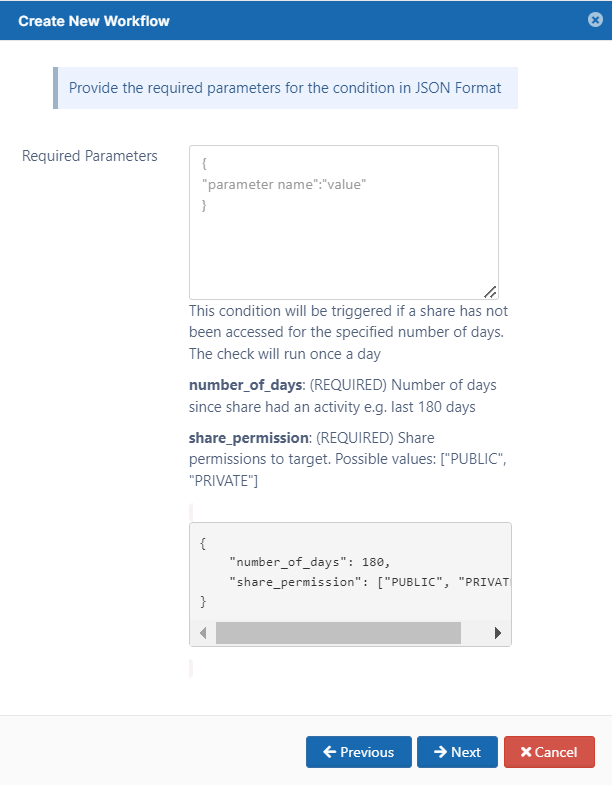
This condition will be triggered when a shared file or folder has not been accessed for the specified number of days.
NOTE: The only supported action is Delete share.
This is useful for removing shared files that are no longer being used
This check will run once a day
share_permission- required as a parameter for this condition to trigger. An array that specifies the type of shares to monitor. Valid values are:
PUBLIC
PRIVATE
Both PUBLIC and PRIVATE may be included in the array.
number_of_days - required to specify the number of days before the current date that a shared file was accessed.
This will be checked once a day and all files that match this condition will be subject to the THEN action you choose.
For example, if you specify the number of days as 15, all shared files or folders that have not been accessed in the last 15 days will subject to the the THEN action you configure.
JavaScript errors detected
Please note, these errors can depend on your browser setup.
If this problem persists, please contact our support.







 Comments can be added to files and folders.