You can decide notto allow your users to edit documents in a browser.
After you configure online editing, FileCloud users can log in to the user portal, select any supported document and click a Web Edit button to edit the document from within the web browser. All the changes made by the user are saved in FileCloud automatically.
If you do not want to support this feature for certain users, the Web Edit button can be removed from the user portal through the users' policies.
To hide the Web Edit button for the users associated with a policy:
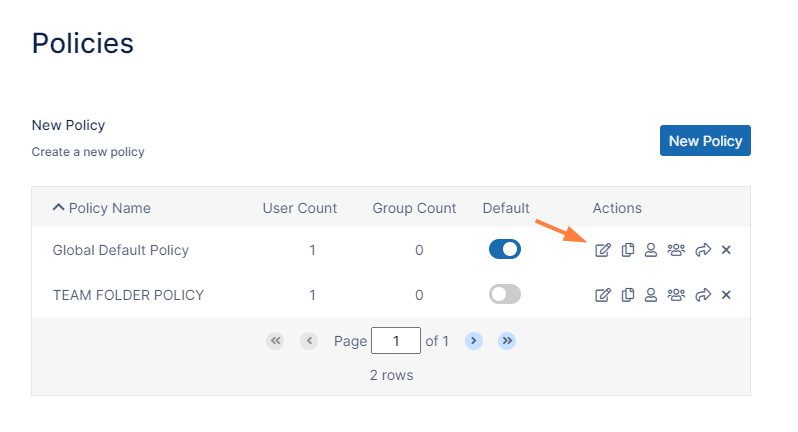
In the FileCloud admin portal's left navigation bar, scroll down and clickSettings.Then, on theSettingsnavigation page, clickPolicies . The Policies settings page opens.
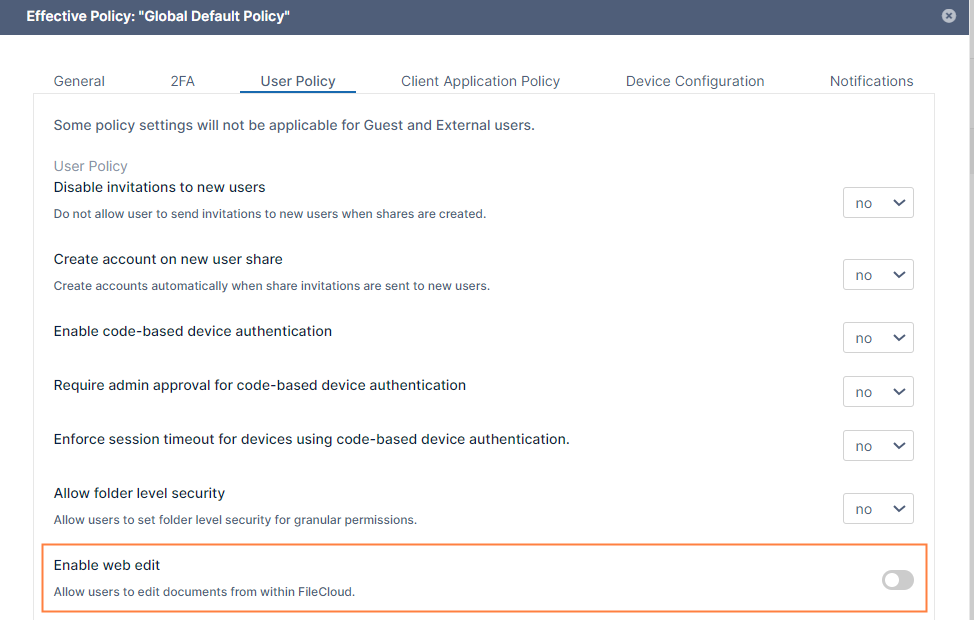
Click the Edit icon in the row for the users' policy. The Policy Settingsdialog box opens.
Click theUser Policytab.
Locate Enable web edit, and disable it.
Click Save.
JavaScript errors detected
Please note, these errors can depend on your browser setup.
If this problem persists, please contact our support.