FileCloud Sizing Guide
This document explains hardware sizing and high availability setup for FileCloud deployments.
- The FileCloud system can be deployed on physical servers
- FileCloud Server can also be deployed in a virtualized environment (VMware, XEN)
- The FileCloud system integrates with any NFS, CIFS, SAN appliance, or s3 compatible object-storage system for file storage
FileCloud Hardware Sizing
The following table shows the underlying usage assumptions used to calculate FileCloud Hardware requirements.
The model assumes:
- a user interacts 60 times per day using one of the FileCloud clients (browser, mobile app, Drive client)
- every user synchronizes data with a Sync client on an average of 2.5 computers
Based on these usage assumptions, FileCloud servers need :
- to handle 290-300 calls per second
- to support 3000 users
FileCloud Performance Model | |
Browser + Mobile + Drive Apps | |
Browser + Mobile + Drive Client Interactions Per Day | 60 |
No of API calls per Interaction | 20 |
Calls Per Second Per User | 0.013889 |
Desktop Sync App | |
% of Users using sync app | 250 |
Sync Check Frequency (secs) | 30 |
Sync App Online (Hours) | 24 |
Calls Per Second per User | 0.083333 |
Total Calls Per Second Per User (Sync + other Apps) | 0.097222 |
User Counts | |
Total users in installation | 3000 |
Total Calls Per Second | 291.67 |
Server Performance | |
Server Handles Requests Per Second | 125 |
Servers Needed | 2.33 |
8-16 CPU 2.6 GHz Intel Xeon with 32 GB RAM | ~125-150 reqs/sec |
To calculate how many web server nodes you will need to support based on number of users, you can use the linked spreadsheet.
High-Availability Requirements
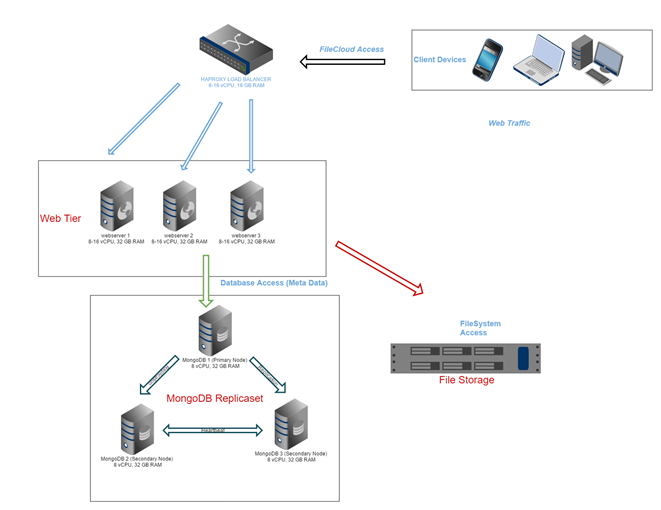
The following diagram explains the FileCloud High Availability Setup
| Component | Requirements | Notes |
|---|---|---|
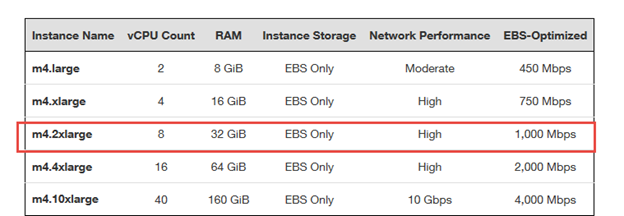
| Web App Server | 1 AWS m4.2xlarge instance can handle approximately 125-150 FileCloud requests per second. To handle 3000 users one will require 2-3 web server instances with m4.2xlarge configuration. AWS m4 instances uses processors identical to Intel E5-2670 v3 processors. To equate this to a virtualized environment, you will require 3 VM nodes and each node need to have the following specs: 8 vCPUs and 32 GB RAM. SSDs are recommended for application servers. | |
| Load Balancer | You must have a software (haproxy) or hardware load balancer for the web application servers. In a virtualized environment, a load balancer is equivalent to a computer with the following specs:
| If you choose to go with HAPROXY, you must use one of the specs for the load balancer:
|
| Database Server | You will need a 3 node MongoDB replica set for FileCloud HA configuration.
| You can probably use 1 TB SSD for each of the node. It is ideal if the MongoDB node VMs can be housed in different physical host. |
| Network | For the front-end network, the following is recommended:
For internal networking between the servers, the following is also recommend:
| Each server should have a dedicated connection to:
|
| File Storage | If an average usage is 5-10 GB per user, then you will require:
|