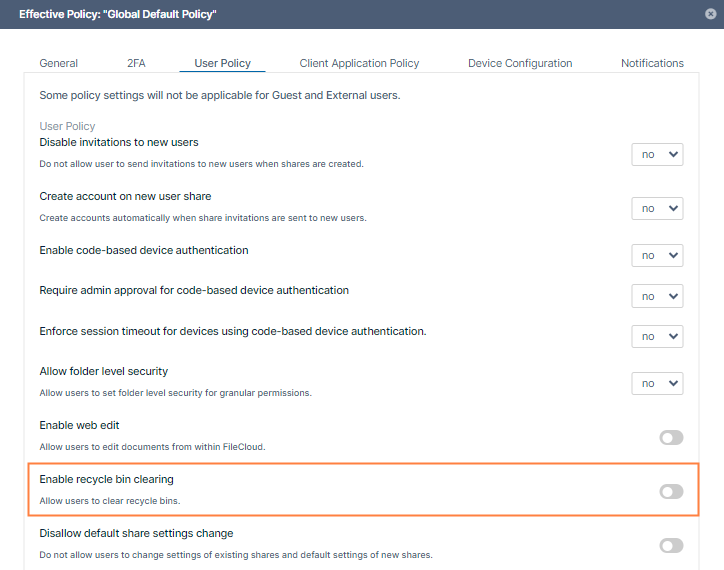
Administrators can allow users to clear all files at once from their recycle bins by enabling Enable recycle bin clearing in the users' policy.
By default, Enable recycle bin clearing is enabled, allowing users to click Clear Deleted Files in the recycle bin.
If Enable recycle bin clearing is disabledin a policy, users belonging to the policy do not see a Clear Deleted Files button in the recycle bin.
Disabling Enable recycle bin clearing doesn't block the delete operation. Users can still remove files from the recycle bin on a file-by-file basis.
To enable or disable recycle bin clearing:
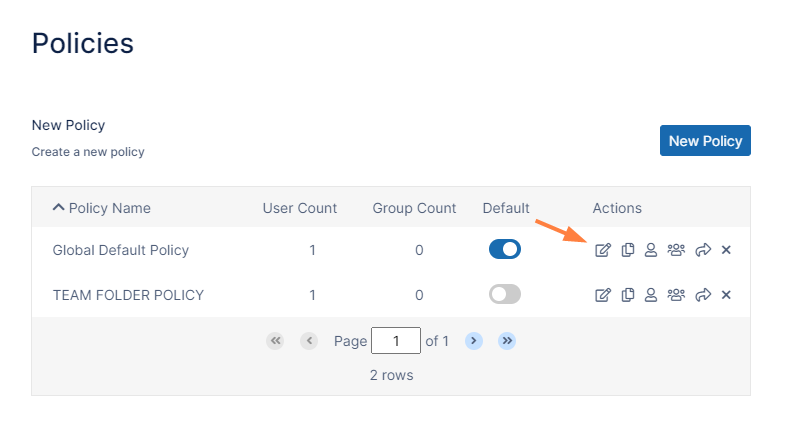
In the FileCloud admin portal's left navigation bar, scroll down and clickSettings.Then, on theSettingsnavigation page, click Policies . The Policies page opens.
Click the Edit icon in the row for the users' policy.
The Policy Settingsdialog box opens.
Click theUser Policytab.
Locate Enable recycle bin clearing, and enable or disable it.
Click Save.
JavaScript errors detected
Please note, these errors can depend on your browser setup.
If this problem persists, please contact our support.

 Disabling Enable recycle bin clearing doesn't block the delete operation. Users can still remove files from the recycle bin on a file-by-file basis.