
Set Advanced Workflow Options

The ability to create and run more advanced scenarios is available in FileCloud version 17.3 and later.

It is important to note that not all actions are compatible with all conditions and it is up to the user to determine and setup correct workflows.
Administrators can create and run more advanced scenarios., such as:
- regular expression in path matching
- the ability to pass additional, runtime-resolved data between conditions and actions
What scenario do you want to use?
Be default FileCloud Workflow Conditions use strict matching in order to check the file/folder path. In 17.3 version a new feature was introduced to enable regular expressions utilisation. In order to enable regular expression match, administrator has to set the use_regex parameter to "1" in the condition definition. This is an optional parameter and by deafult will take the "0" value (don't use regular expressions - use strict match instead). If regular expressions are enabled administrator has to provide a valid regular expression pattern as the parent_folder_path_string value. This pattern will be used in the condition resolution process to find all matching paths (files / folders), for which the action should be run.
Regular expressions are supported by the following workflow conditions:
- if a file is created
- if a folder is created
- if a file is updated
- if a file is deleted
- if a folder is deleted
- if a file is downloaded
- if a comment is added
- if a file is added or updated
Parameters definition - example
Strict match
{
"parent_folder_path_string":"/userid/somepath",
}
or
{
"parent_folder_path_string":"/userid/somepath",
"use_regex":"0"
}
Regular expression
{
"parent_folder_path_string":"/userid/somepath",
"use_regex":"1"
}
Usage - Example
For simplicity sake assume that Administrator wants to send email notifications whenever someone downloads a file from a given location. The following example shows the difference between strict match and regular expression match
Strict match
Parameters are defined as follows:
{
"parent_folder_path_string":"/userA/downloads",
}
For such defined condition action will be triggered whenever a files is downloaded directly from the "/userA/downloads" directory and only from this one.
Regular expression
In this case the definition might look something like:
{
"parent_folder_path_string":"~/.*/downloads~",
"use_regex":"1"
}
For this condition action will be triggered for all directories that match the /user/download format, i.e. /userA/downloads, /userB/downloads, etc. This is a huge change that enables Administrators to define much more universal workflow scenarios.
Important
Regular expression patterns aren't validated for correctness. Please double check them, especially when dealing with the data-changing actions (i.e. delete files / move files, etc.).

RegEx Patterns
Regular expression definition has to start and end with one of the following characters:
'/', '~', '@', ';', '%', '`'
We strongly advise against the / usage as it adds confusion to the pattern definition.
The Exclude parameter enables the "reversed" path matching. That means that the specified action will be triggered for all files / folders whose path doesn't match. It's another huge change that allows administrators to define a new set of workflow. This is a very flexible and poweful feature, especially when combined with regular expressions.
Exclude parameter is supported by the following conditions:
- if a file is created
- if a folder is created
- if a file is updated
- if a file is deleted
- if a folder is deleted
- if a file is downloaded
- if a comment is added
- if a file is added or updated
Example
Administrator wants to delete all files that were downloaded form the FileCloud, but wants to keep files in one particular location - /userA/prevented. Condition should be then defined as:
{
"parent_folder_path_string":"/userA/prevented",
"exclude":"1"
}
The match condition will be reversed, so action will be triggered for all files, except the ones located in this particular directory.
Regular Expressions
For a regular expression it is very important to understand that if it is invalid it will return a NOT MATCH result for all paths. Administrators have to be very careful when using exclude parameter with regular expressions, especially for a data sensitive operations.
Runtime resolved parameters is a feature available in FileCloud from verision 17.3. The idea behind the process is that conditions can 'publish' a set of additional parameters (or placeholders to be more precise) which can be later utilize in the action. It is not a default behavior and it has to be implicitly implemented by both: conditions and actions.
In the 17.3 version runtime resolved parameters are provided by the following conditions:
- if a file is created
- if a folder is created
- if a file is updated
- if a file is deleted
- if a folder is deleted
- if a file is downloaded
- if a comment is added
- if a file is added or updated
- if the file updated is bigger than the expected size
- if the file downloaded is bigger than the expected size
and might be utilized in all compatible actions. The process works as follows:
- Each condtion may define a special set of placeholders that might be used as a part of the parameter definition in the compatible action.
- After the condition is met FileCloud resolves values for each placeholder. It is done at runtime and might allow, i.e. dynamic path definitions.
- Condition passes the resolved dictionary (placeholder - value pairs) to the action.
- If any placeholder is used in the action parameter definition it is replaced with the resolved value.
- Action executes normally with all parameters resolved at runtime.
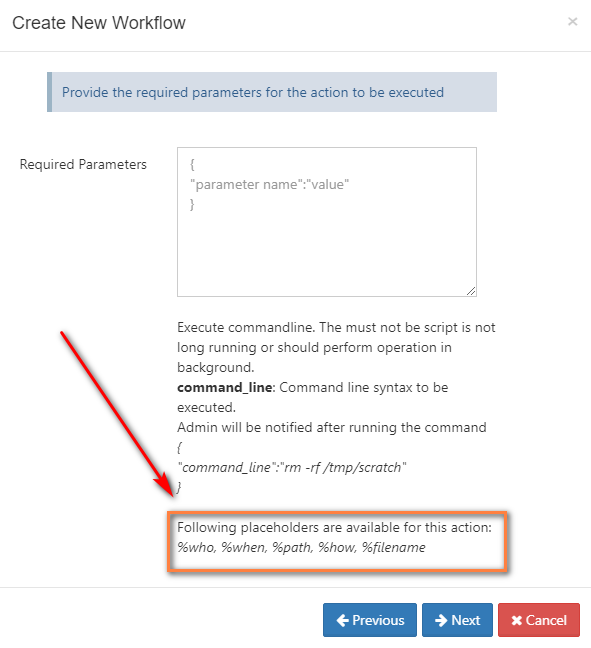
Currently FileCloud supports placeholders only for the file/folder related conditions. The whole set contains:
- %who - user who performed the action that triggered the condtion (i.e. file upload or download)
- %when - time of the action
- %path - path of the file / folder
- %how - user agent of the performed action (i.e. a browser type, etc.)
- %filename - name of the file
If selected condition implements runtime resolved parameters it will be reflected in the Action definition modal window:
Example - how condition resolves parameters
Assume that user1 downloaded a file file1.pdf from the /user1/test folder through a Firefox browser on 4pm on the 01.01.2018.
Condition will resolve all the parameters and pass it to the action:
- %who - user1
- %when - 2018-01-01 16:00:00
- %path - /user1/test/file1.pdf
- %how - Web browser
- %filename - file1.pdf
Recommended usage
Although it is possible to use resolved parameters in all compatible actions, this feature was designed and implemented mainly for the command execution action.