
Solr High Availability Setup with Pacemaker and Corosync

This setup requires two Linux Solr hosts with an NFS resource mounted on them, a quorum device, and an HAProxy load balancer. These resources must be in an active/passive configuration.
In the following documentation, the Solr servers run on Linux CentOS 7, but you may use any Linux distribution that enables you to set up a Pacemaker/Corosync cluster.
Introduction
FileCloud provides advanced search capabilities using Solr (an open source component) in the backend. For some cases, service continuity requires a high availability setup for Solr, which you can configure using the following instructions.
Prerequisites
- The cluster in the setup used in these instructions includes the following. Your setup should have similar components.
solr01 – Solr host cluster node
solr02 – Solr host cluster node
solr03 – quorum device cluster node
solr-ha – HAProxy host
NFSShare – NFS resource mounted on solr01 and solr02
- Install all patches available for FileCloud.
Perform the following steps for sor01, solr02, and solr03.
To update all packages, run:
CODEyum update- Reboot the system.
To install the package which provides the nfs-client subsystems, run:
TEXTyum install -y nfs-utilsTo install wget, run:
TEXTyum install -y wget
Install Solr
On solr01:
- Perform a clean install of your Linux operating system.
To download the FileCloud installation script, filecloud-liu.sh, enter:
TEXTwget http://patch.codelathe.com/tonidocloud/live/installer/filecloud-liu.shTo create the folder /opt/sorfcdata, enter:
TEXTmkdir /opt/solrfcdataMount the NFS filesystem under /opt/sorfcdata:
TEXTmount -t nfs ip_nfs_server:/path/to/nfs_resource /opt/solrfcdataInstall solr by running the FileCloud installation script:
Run:
TEXTsh ./filecloud-liu.sh- Follow the instructions in the windows until you reach the selection screen:
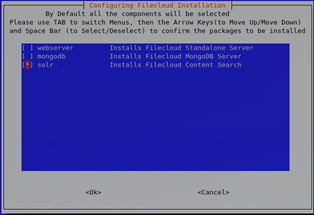
- Select solr only, then wait a few minutes until you receive confirmation that installation is complete.
Bind solrd to the external interface instead of localhost only:
On solr01 and solr02 open:
/opt/solr/server/etc/jetty-http.xml
and change:
<Set name="host"><Property name="jetty.host" default="127.0.0.1" /></Set>
to:
<Set name="host"><Property name="jetty.host" default="0.0.0.0" /></Set>
Change from systemV daemon control to systemd.
To stop Solr on solr01 and solr02, enter:
CODE/etc/init.d/solr stopTo remove the existing service file in /etc/init.d/solr, enter:
CODErm /etc/init.d/solrTo create a new solrd.service file, enter:
CODEtouch /etc/systemd/system/solrd.serviceTo edit the solrd.service file, enter:
CODEvi /etc/systemd/system/solrd.serviceEnter the following service definition into the file:
CODE### Beginning of File ### [Unit] Description=Apache SOLR [Service] User=solr LimitNOFILE=65000 LimitNPROC=65000 Type=forking Restart=no ExecStart=/opt/solr/bin/solr start ExecStop=/opt/solr/bin/solr stop ### End of File ###- Save the solrd.service file.
- Verify that the service definition is working. Perform the following steps on solr01 and solr02:
Enter:
TEXTsystemctl daemon-reload systemctl stop solrd- Confirm that no error is returned.
Restart the server by entering:
TEXTsystemctl start solrd systemctl status solrd- Confirm that the output returned resembles:

Remove the content of folder /opt/solrfcdata on solr02 only.
TEXTsystemctl stop solrd rm -rf /opt/solrfcdata/*
Update the firewall rules on solr01 and solr02 if necessary:
TEXTfirewall-cmd --permanent --add-port 8983/tcp firewall-cmd --reload