
Example: Setting Up a Retention Policy to meet HIPAA Requirements
The customer we'll look at in this example is Community HMO, a health maintenance organization whose FileCloud users are both health care professionals and administrative personnel. In this example, your role is the FileCloud admin.
To meet the requirements for passing two of the rules in the Compliance Center's HIPAA screen, you must choose a retention policy that ensures you retain ePHI data. These rules are:
- 164.312(c)(1) - Technical Safeguards - Set up a retention policy to protect files and folders from deletion.
- 164.316(b)(2)(i)- Policies and procedures and documentation requirements - Use Retention Policy to retain files for 6 years.
This example will walk you through the process necessary to pass these requirements. The broader steps involve:
- Enabling the HIPAA retention policy rules in the Compliance Center.
- Creating a metadata attribute to tag files with ePHI data.
- Creating a pattern group that identifies file content as ePHI.
- Setting up a Smart Classification rule to locate and tag ePHI files.
- Setting up a retention policy that prevents these files from being deleted for 6 years after their creation.
- Choosing the retention policy in the Compliance Center for each of the requirements listed above.
Step 1: Enable the HIPAA retention policies rules in the Compliance Center.
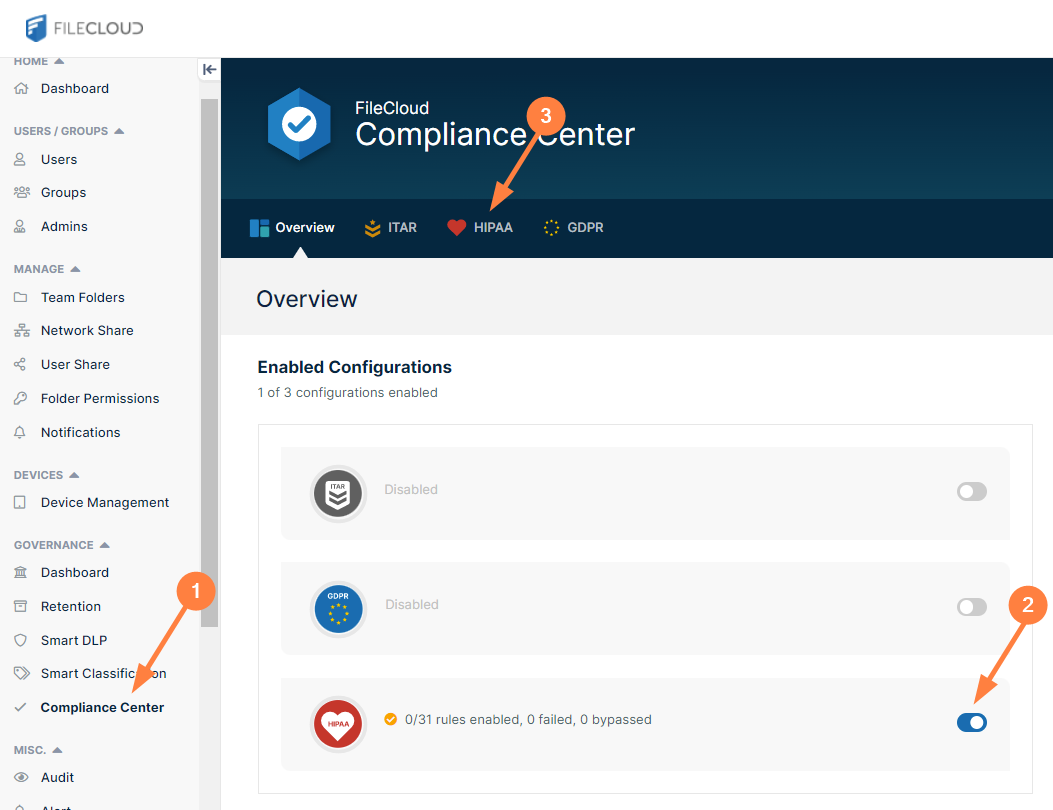
- In the Admin portal's navigation panel, click Compliance Center.
The Compliance Center opens to the Overview tab. - Under Enabled Configurations, click the slider next to the HIPAA icon.
- To go to the HIPAA Compliance page, click the HIPAA link in the menu bar.
The HIPAA page opens. In this example, you have not enabled any of your HIPAA rules yet.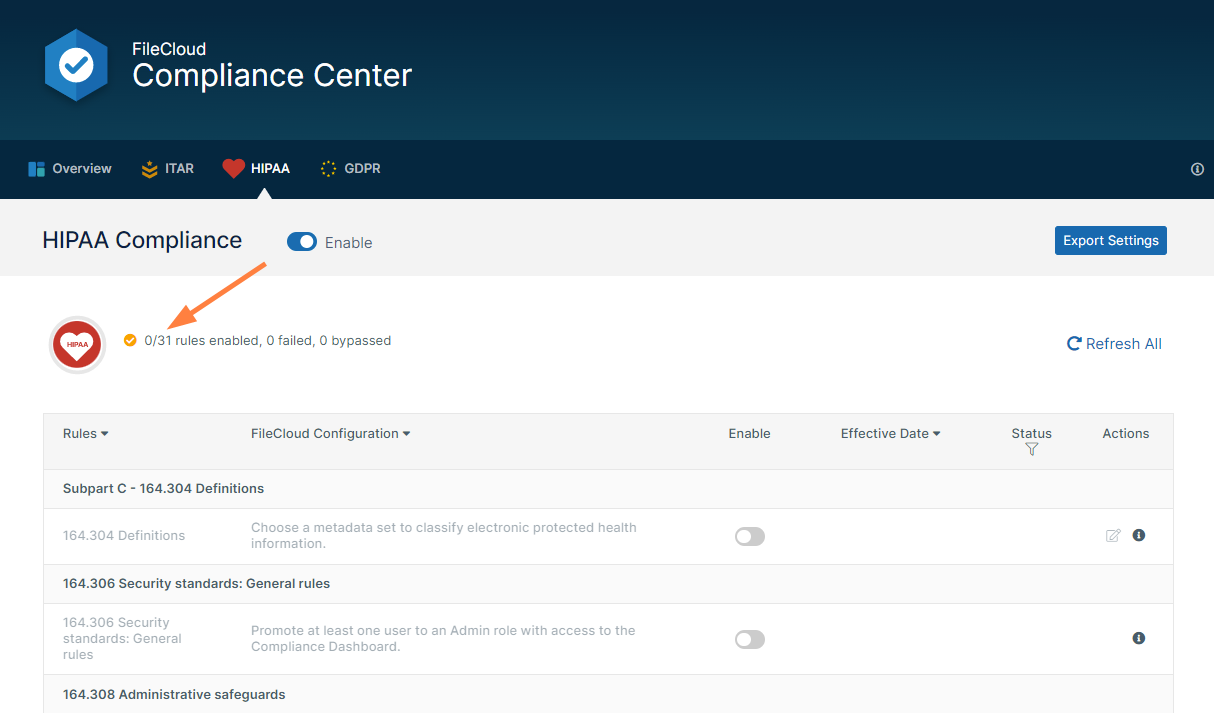
- Scroll down so you can see rules 164.312(c)(1) and 164.316(b)(2)(i).
These are the two rules that you will set up retention policies for. - Enable each rule.
For each rule, you are prompted to choose a retention policy that enables you to pass the rule.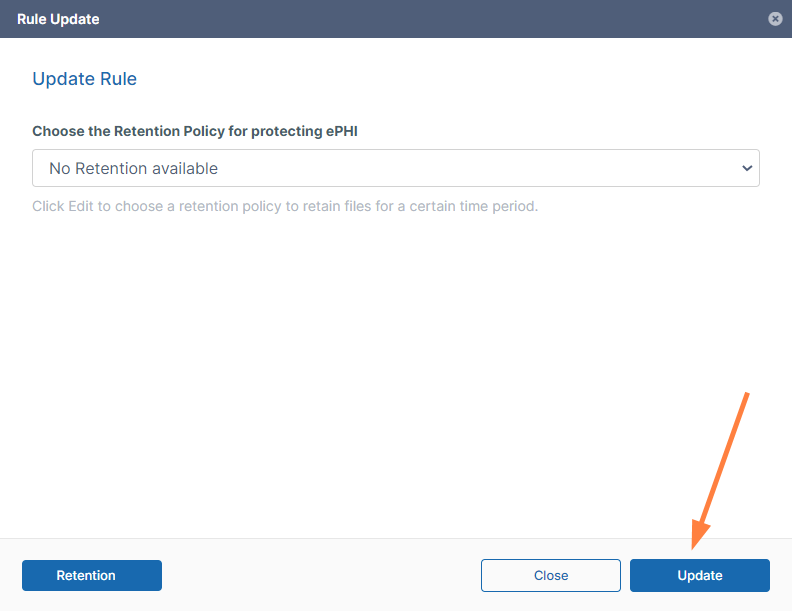
- Since you have not set up the retention policy yet, click Update without attempting to select a retention policy.
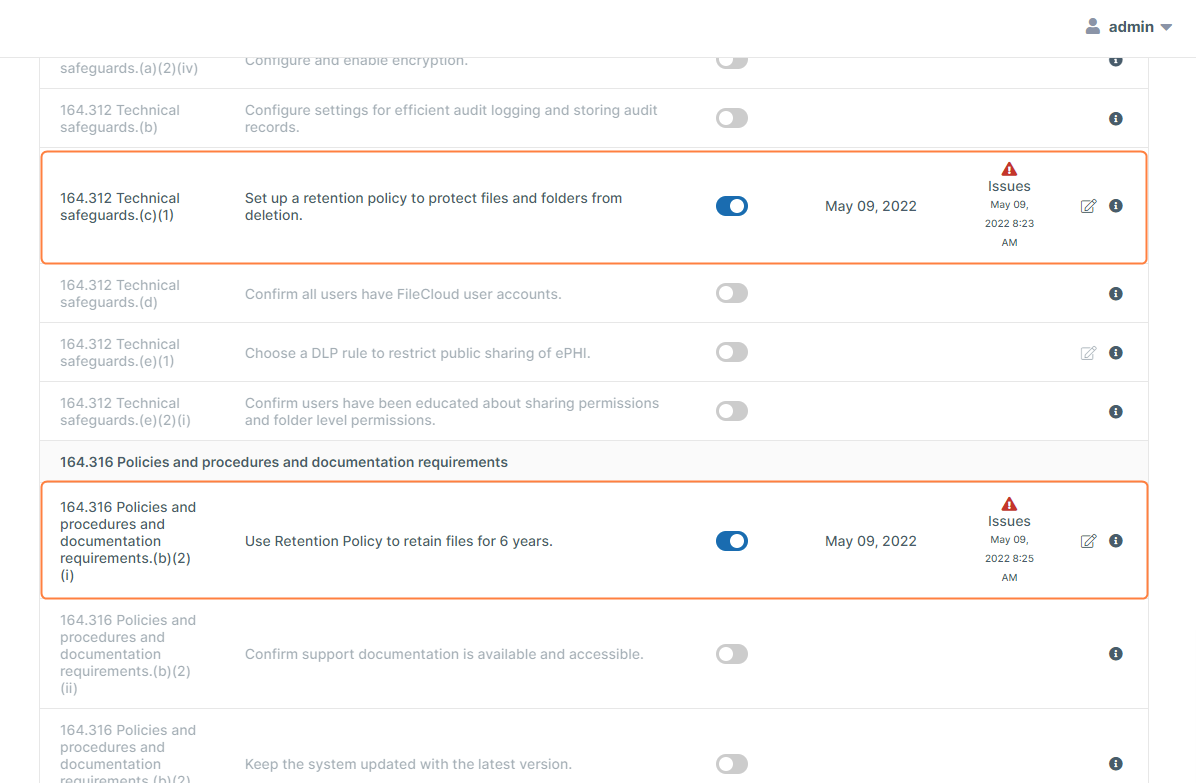
The row for each rule will indicate that FileCloud has failed the rule.
Step 2: Create a metadata attribute to tag files with ePHI data
The function of HIPAA compliance is to protect electronic protected health information, such as individuals' medical records and insurance information. Before you can place safeguards on this information, it's necessary that you identify which files contain it. You can do this by configuring FileCloud's smart classification system to flag files that contain the wide range of information considered ePHI, for example, medical diagnoses and insurance policy numbers.
When the smart classification system finds a file with ePHI, it tags it with metadata to let FileCloud know that the file contains ePHI.
To identify a file as containing ePHI, you must tell the content search engine what patterns (character strings) to look for in the file's contents. For example, if the file contains the pattern "Ins Policy ID" that could indicate that the file contains ePHI. You must include all of the possible patterns that indicate a file contains ePHI, and then flag each of these files with a metadata tag.
There are also files with handwritten diagnostic information that doctors scan into your system. This is ePHI that smart classification cannot locate, and must be flagged with metadata manually. Therefore, you must give some users permission to add the metadata manually when you create it.
- Create the metadata to tag the file with.
- To open the Metadata page, in the admin portal navigation pane, click Metadata.
- Click Add Metadata Set.
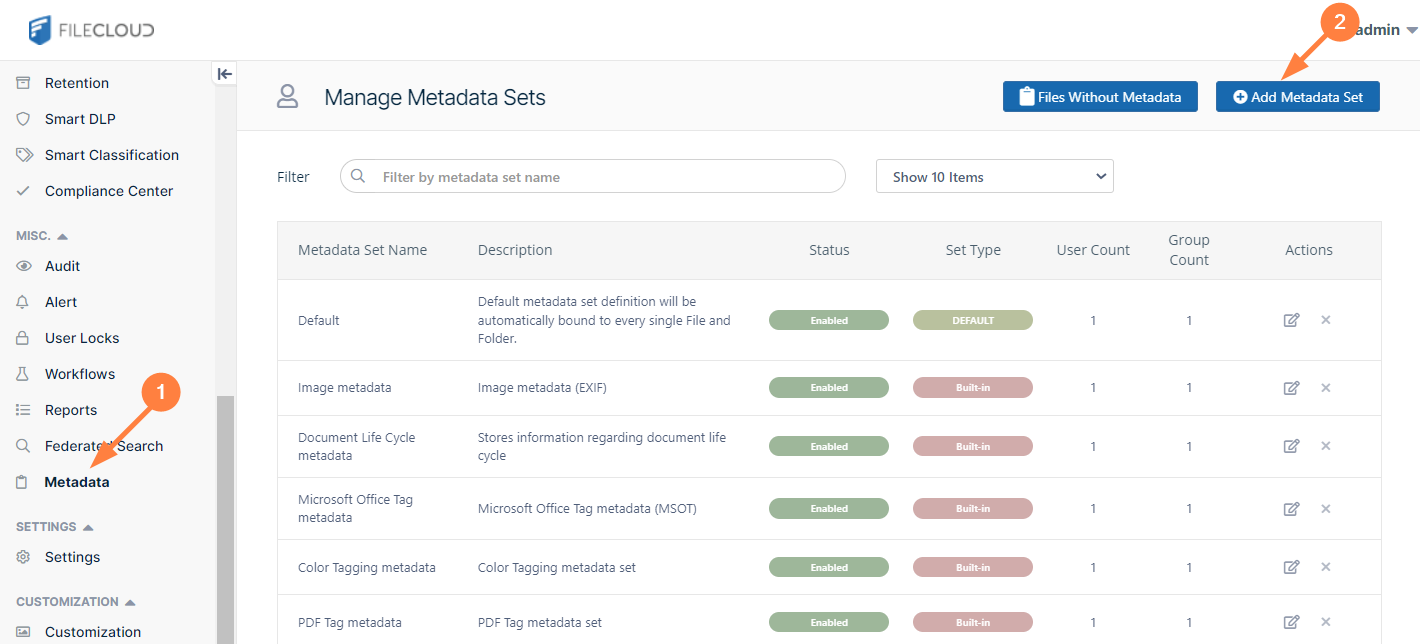
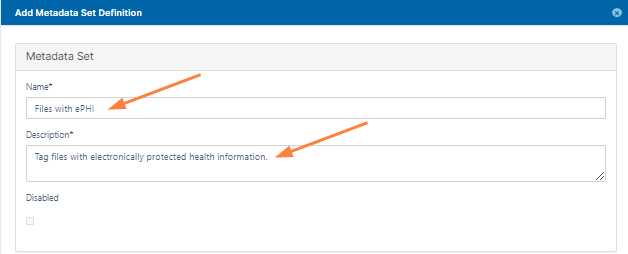
The Add Metadata Set Definition dialog box opens. - Enter the values for the metadata set.
For this example:- In Name, enter Files with ePHI.
- In Description, enter Tag files with electronically protected health information.
- In the Attributes box, click Add Attribute.
For this example, in the Add Attribute dialog box, in Name, enter ePHI and in Attribute type, choose Boolean.
Whenever a file has ePHI, this Boolean value will be set to 1.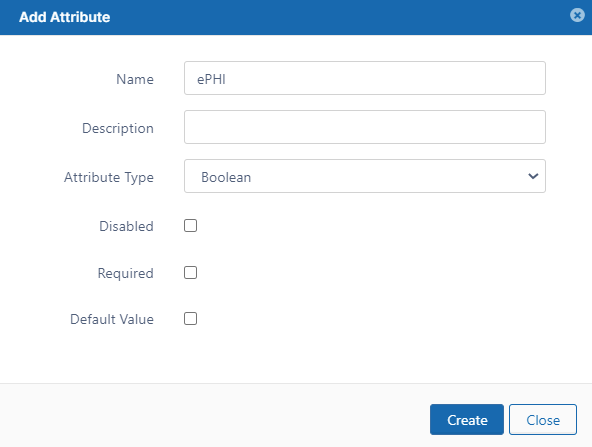
- Click Create.
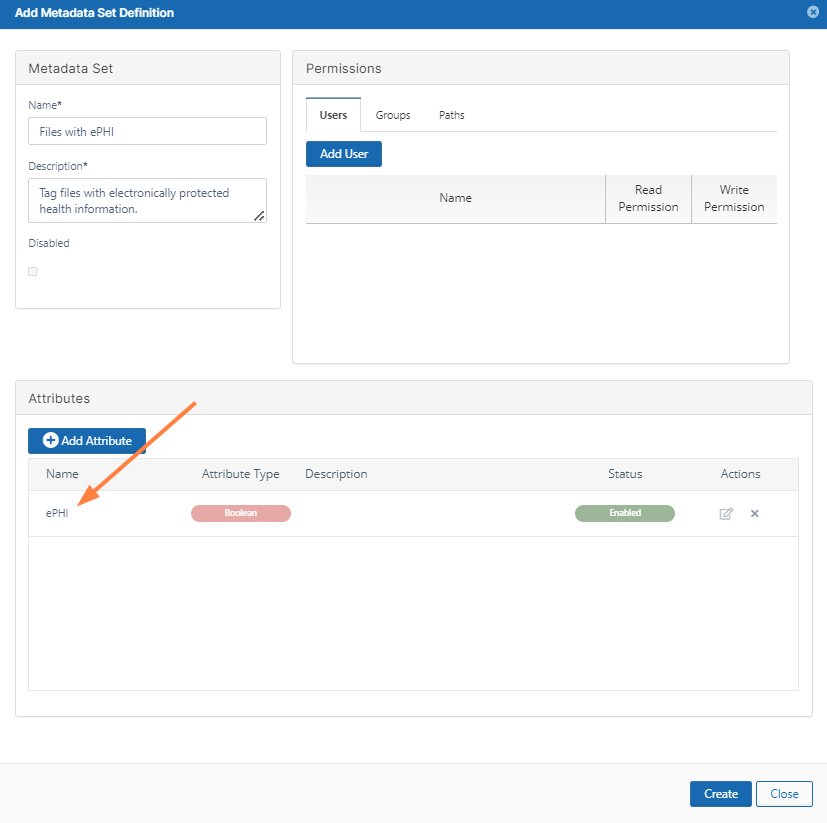
Now add a user who can manually flag files with the ePHI metadata: - In the Permissions box, click Add User.
- Enter the user or users who will be manually marking scanned doctor notes as having ePHI data, and give them Read and Write permissions.
Read permission enables the user(s) to view the metadata, but Write permission enables them to change it, so the user(s) you add should have a good understanding of what constitutes ePHI in your system.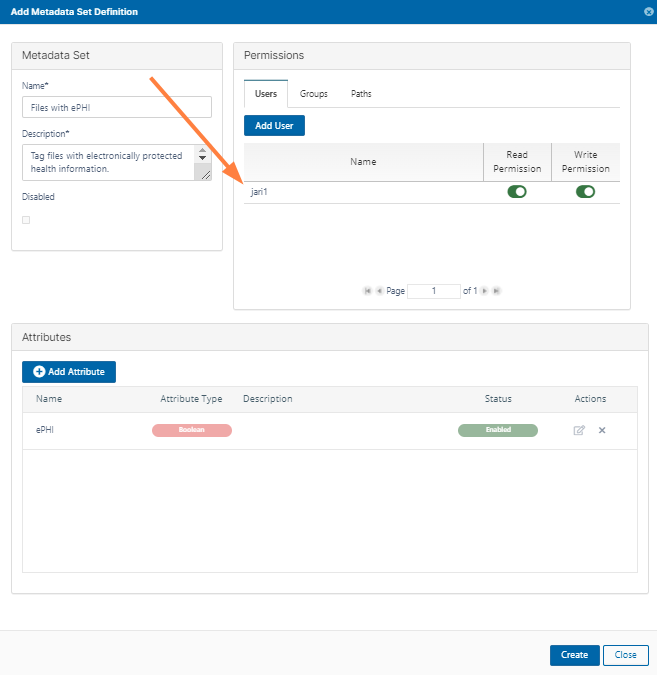
Step 3: Create a a pattern group that identifies file content as ePHI
Community HMO has the following types of files that contain PHI:
- Medical records that all have the string Medical Record Number in them.
- Insurance records that all have the string Insurance Policy ID in them.
- Scanned doctor diagnosis notes.
You have determined that the scanned doctor diagnosis notes will have to be tagged with metadata manually, and that smart classification can automatically search for the identifying strings in the medical records and insurance records.
To configure the pattern group for identifying PHI:
- In the admin portal navigation pane, click Smart Classification.
The Manage Content Classification Rules screen opens. - Click Manage Pattern Group.
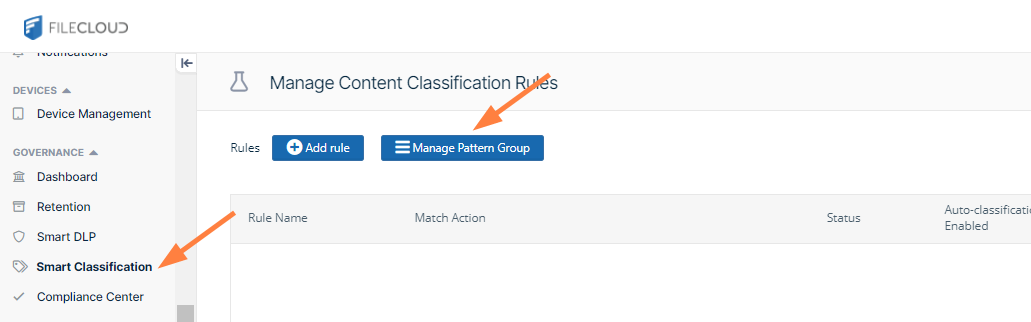
The Manage Pattern Groups dialog box opens.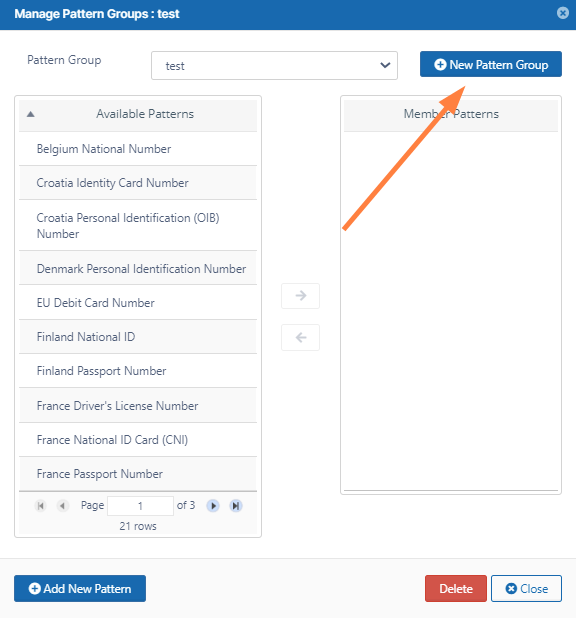
- Click New Pattern Group.
- For this example, name the new group ePHI Patterns.
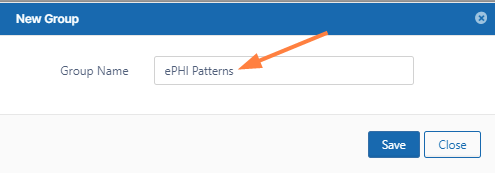
- Click Save, and in the Pattern Group drop-down list, choose ePHI Patterns.
Now, you are ready to add the patterns that smart classification will search for in your files. When it finds any of these patterns in a file, it will tag it with the ePHI metadata attribute. - Click Add New Pattern.
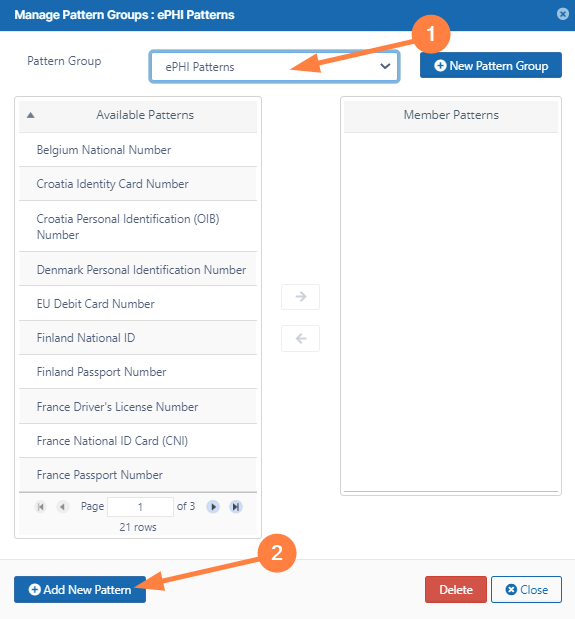
The New Pattern dialog box opens. - Click Add.
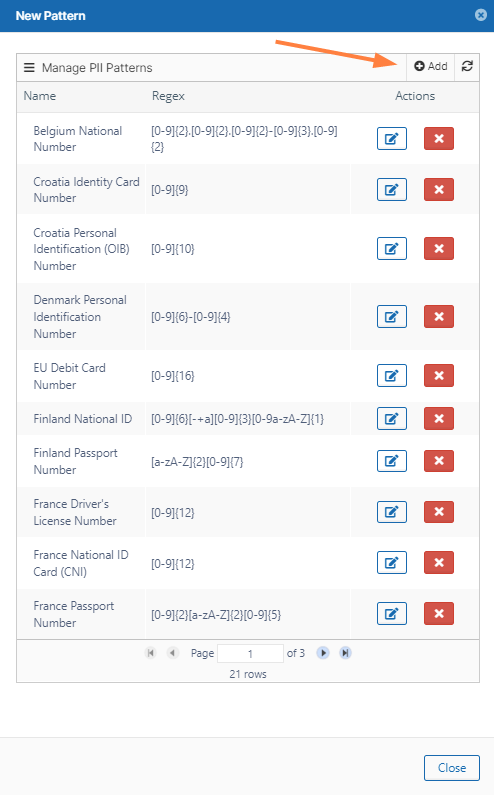
The New PII Search Pattern dialog box opens. - Enter MRN in Name, and enter MRN in Regex.
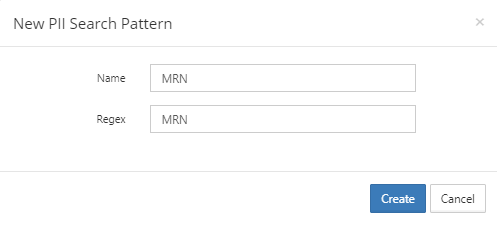
- Click Create.
- Click Add again, and in the New PII Search Pattern dialog box enter Ins Policy ID in both Name and Regex.
- Click Create.
- Close the New Pattern dialog box.
- In the Manage Pattern Groups dialog box, confirm that you still have ePHI Patterns selected in the Pattern Group field.
- In the Available Patterns box, scroll to the last page, and click MRN, then click the right arrow.
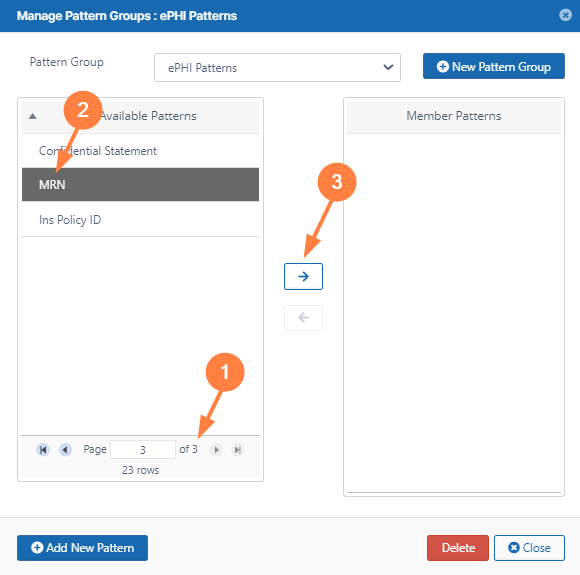
The pattern appears in the Member Patterns box. - In the Available Patterns box, click Ins Policy Number, and then click the right arrow.
Both patterns now appear in the Member Patterns box.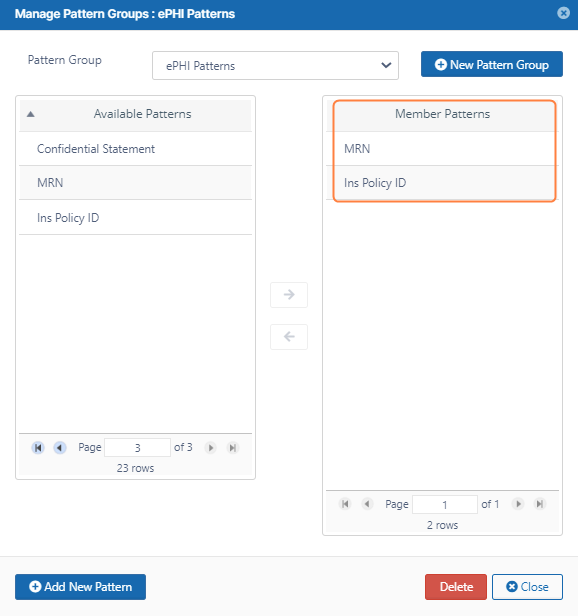
- Click Close.
Step 4: Set up a Smart Classification rule to locate and tag ePHI files
Now that you have configured the search patterns for identifying ePHI in files, you can set up a smart classification rule that uses the patterns to find and tag the files.
To set up the smart classification rule:
- In the admin portal navigation pane, click Smart Classification.
The Manage Content Classification Rules screen opens. - Click Add Rule.
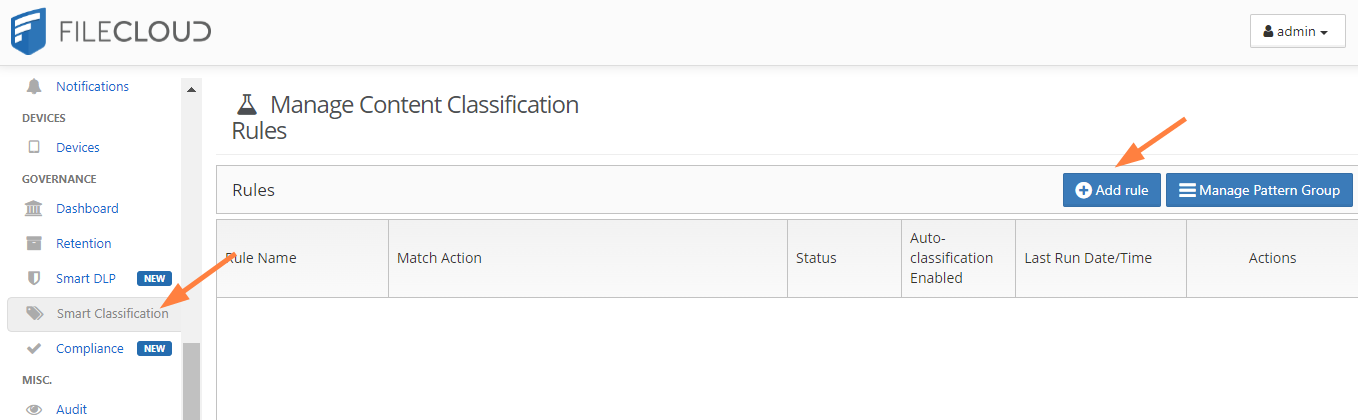
An Add Rule dialog box opens. - Fill in values for the fields.
- In Name, enter Classify files with PHI.
- In Event triggers, choose FILEINDEXED. This indicates that when the file is indexed, smart classification should apply this rule (that is, set the ePHI metadata attribute to true).
- Check Enable Auto-classification.
- In Definition, define the rule. To simplify setting it up, copy and paste the Rule Template from the space under it, and modify the template.
Enter the rule as:
{
"classifier": "Default",
"precondition": "true",
"condition": "count(_classifications) > 0",
"matchaction": {
"Files with ePHI": {
"ePHI": true
}
},
"defaultaction": [],
"parameters": {
"SEARCH_PATTERN_GROUPS": [
"ePHI Patterns"
]
}
}
The rule indicates that if either of the search patterns (MRN and Ins Policy ID) in the search pattern group ePHI Patterns are found in the file being indexed, the metadata attribute ePHI is set to true.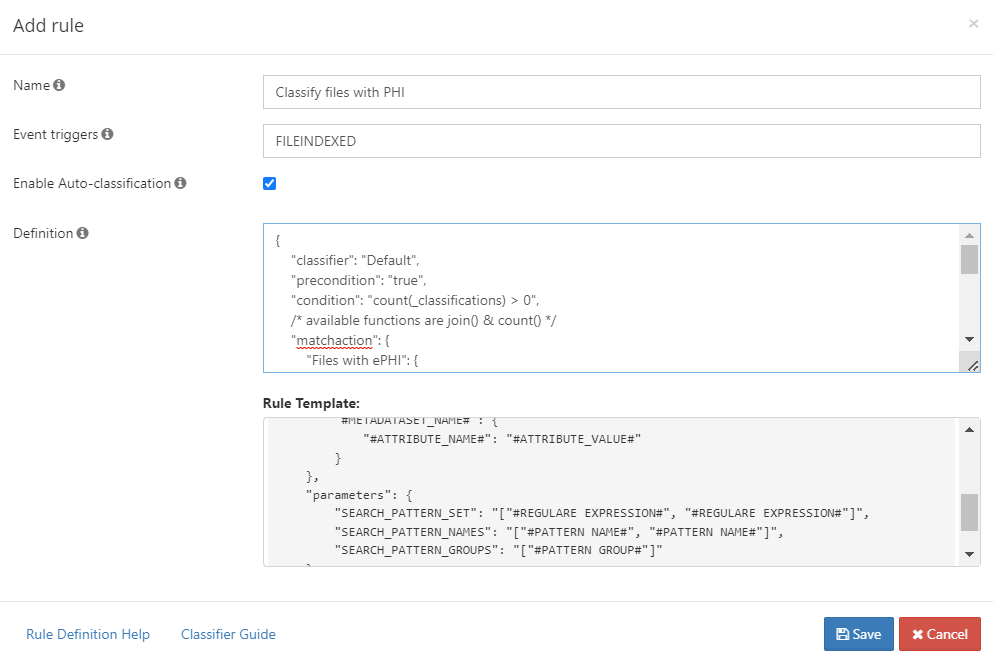
- Now, test the smart classification rule.
- Obtain or create some files that contain the ePHI patterns.
We include:- a test file with an MRN, Patient 2457.txt:
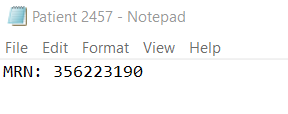
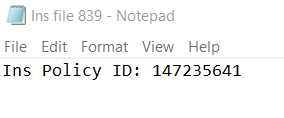
- a test file with and insurance policy id, Ins file 839.txt:
- a test scanned handwritten note, Doctor Notes.pdf:

- a test file with an MRN, Patient 2457.txt:
- Log in to the FileCloud user portal as the user you gave permissions to read and write the Files with ePHI metadata.
- Upload the files into FileCloud.
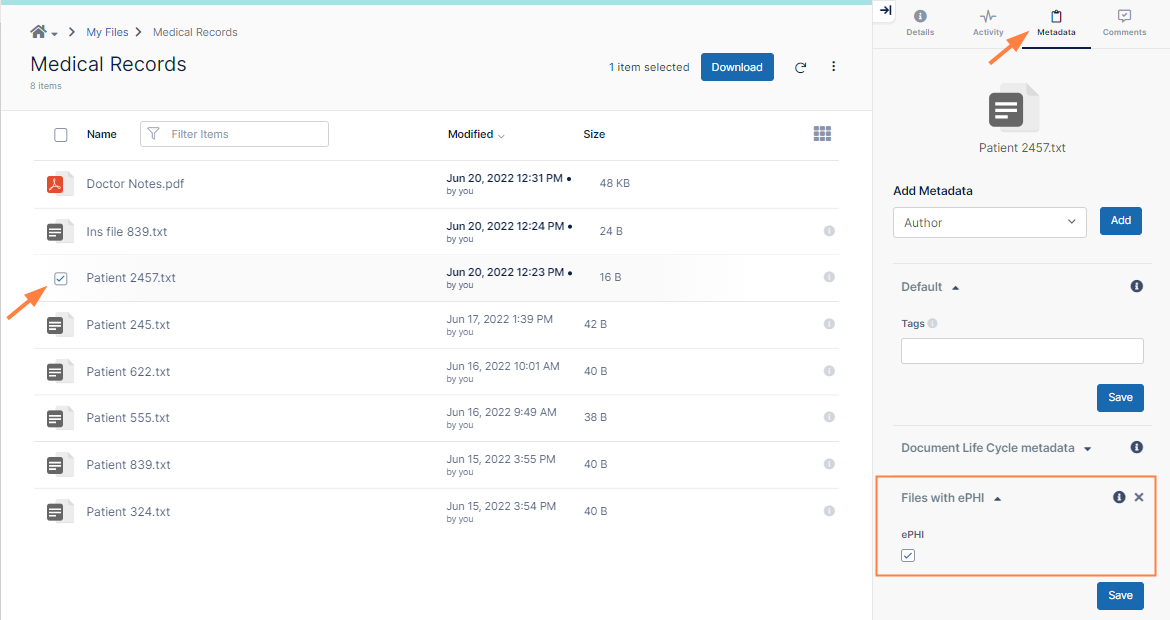
- Check the checkbox for the file Patient 2457.txt and click Metadata in the details pane. Confirm that Files with ePHI is listed and that the ePHI metadata attribute is checked.
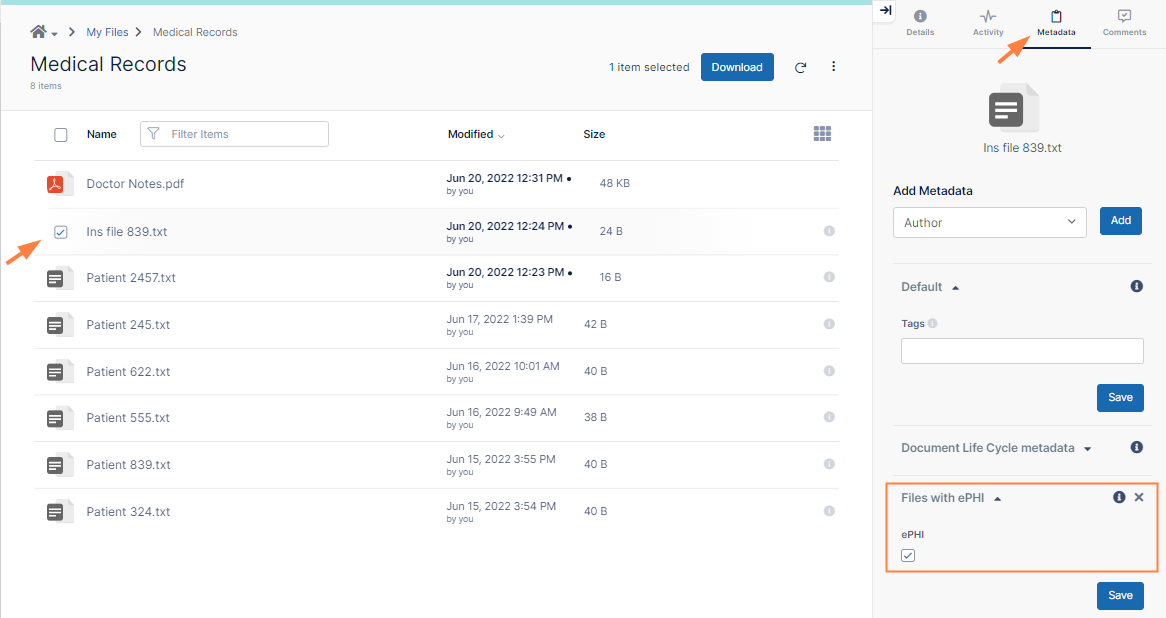
- Then check the checkbox for the file Ins file 839.txt, and click Metadata in the details pane. Confirm that Files with ePHI is listed and that the ePHI metadata attribute is checked.
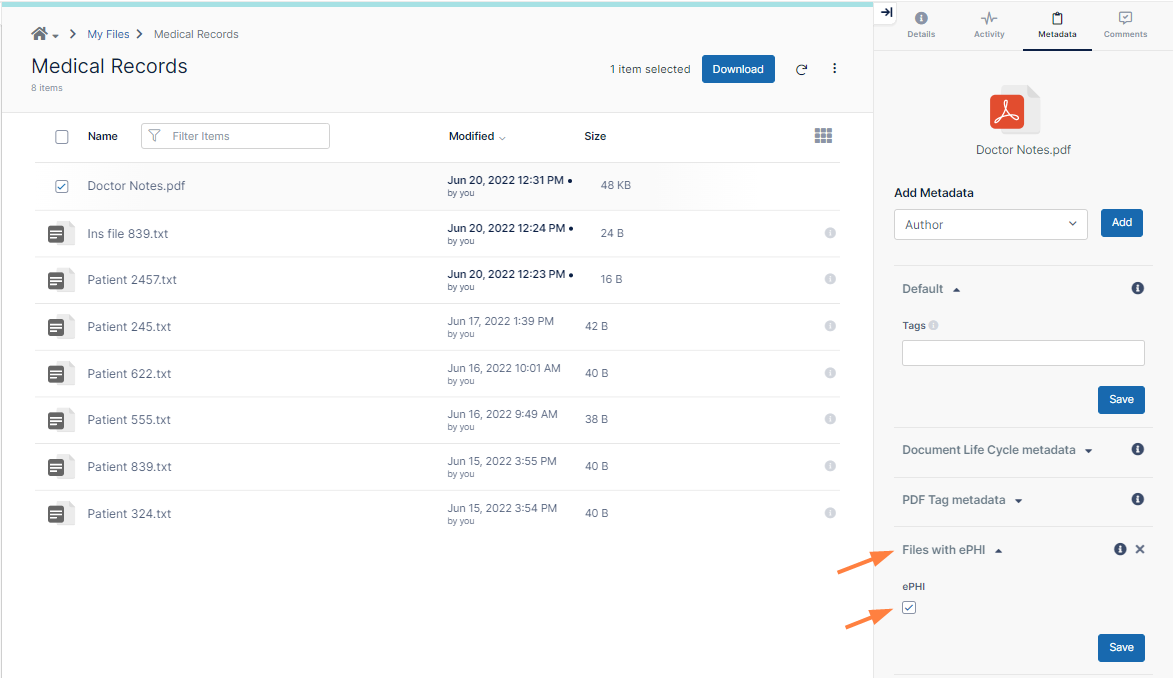
- Next, check the checkbox for the file Doctor Notes.pdf, and click Metadata in the details pane. Files with ePHI is not yet listed since you are required to check it manually.
- In the Add Metadata drop-down list, choose Files with ePHI and click Add.
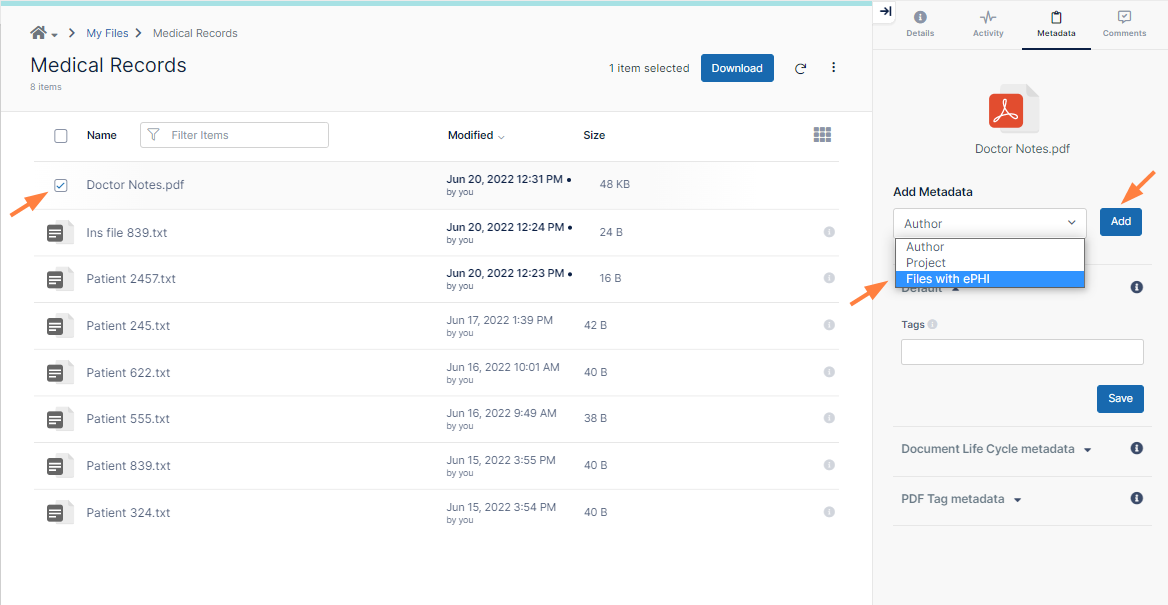
Files with ePHI is added to the list of included metadata. - Check ePHI to indicate that the file has ePHI.
- Obtain or create some files that contain the ePHI patterns.
Step 5: Set up a 6 year retention policy
The next step is to create the 6 year retention policy that is applied to files with an ePHI metadata attribute of true.
To create the 6 year retention policy:
- In the admin portal navigation pane, click Retention.
The Manage Retention Policies screen opens. - Click Add Policy.
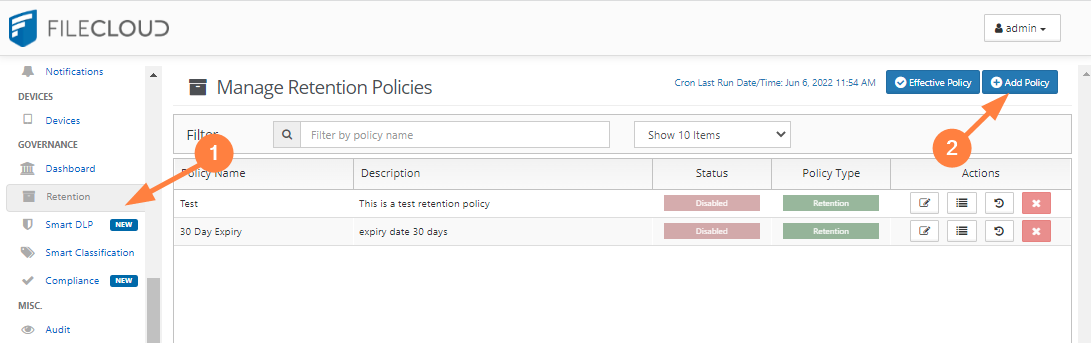
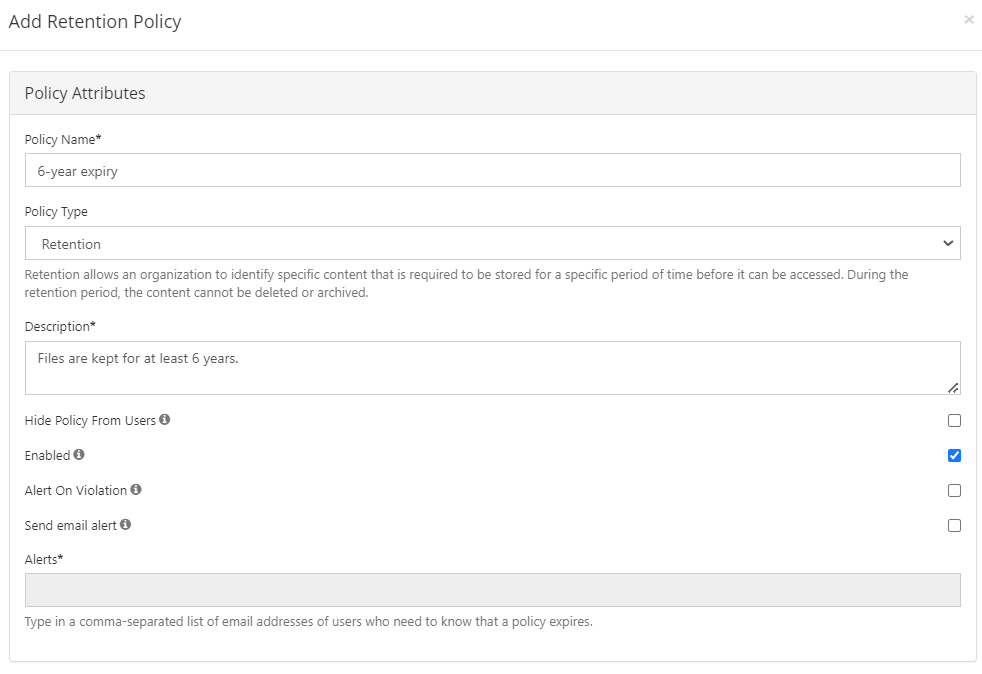
The Add Retention Policy form opens. - Fill out the Policy Attributes section of the form.
- In Policy Name, enter 6-year expiry.
- In Policy Type, leave Retention selected.
A Retention type policy prevents a file from being deleted, and this fulfills our requirements. - In Description, enter, Files are kept for at least 6 years.
- Leave the checkboxes in this section at their default values (only Enabled should be checked).
- Add the metadata condition to the Apply Policy To section:
- Click the Metadata tab.
- In the drop-down list of metadata sets, choose the metadata set you created for personal health information, Files with ePHI.
A drop-down list of metadata attributes appears. - Choose ePHI.
ePHI is listed below the drop-down list with a checkbox. - Select the checkbox to indicate that the retention policy should be applied if ePHI is true.
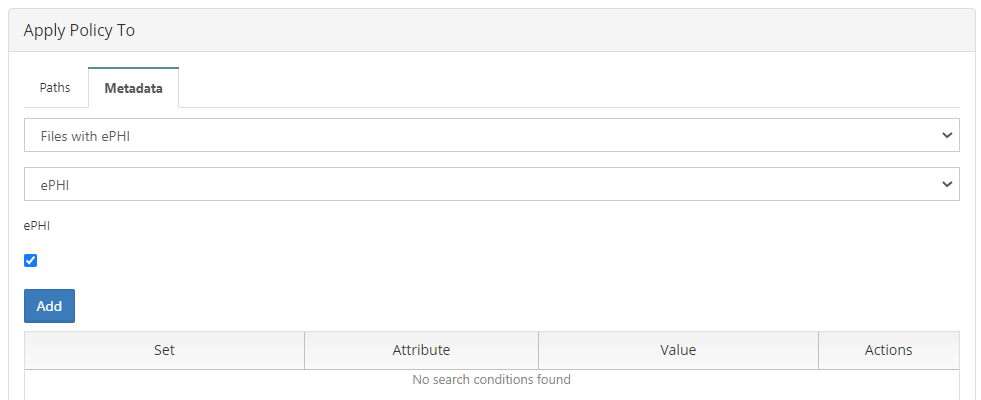
- Click Add.
The condition is added: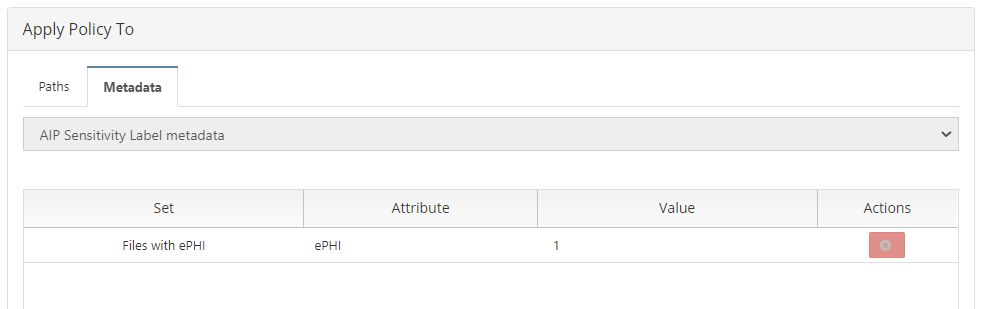
- Fill out the Actions section.
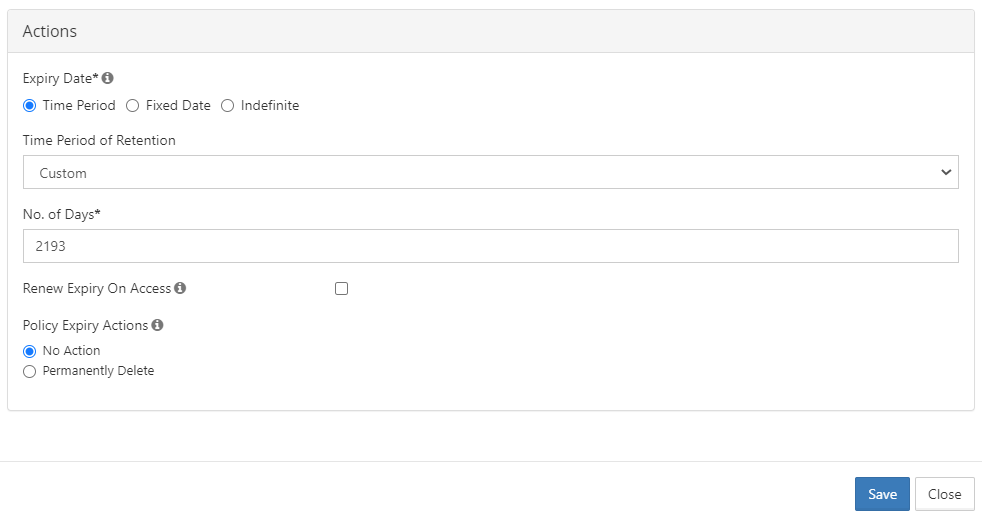
- Leave Time Period selected.
- In Time Period of Retention choose custom so you can set a period that is more than 6 years.
- The time period required in rule 164.316(b)(2)(i) is over six years, so in No. of Days enter 2193 [2190 (365 x 6 years) + 2 (for 2 possible leap years) + 1(to make the period over, not equal to 6 years).
- Uncheck Renew Expiry on Access since the HIPAA rule requires that the records be saved 6 years after creation, not 6 years after access.
- For Policy Expiry Actions leave No Action selected since files must be saved for a minimum of 6 years, but are not required to be deleted after that.
- At the bottom of the form, click Save.
The retention policy is added and enabled by default. Now, each time a file is indexed, FileCloud will check if ePHI is true, and if it is, it will apply the 6-year retention policy to the file.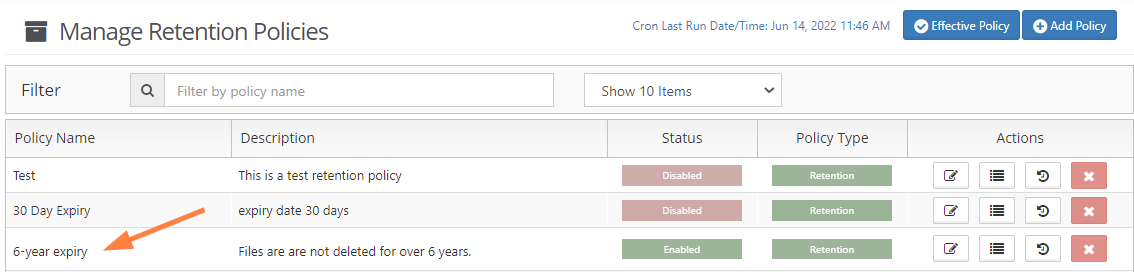
- Now test the retention policy.
Obtain some files with ePHI content, like the ones you used for testing in Step 4.
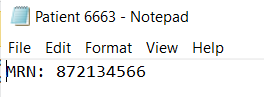
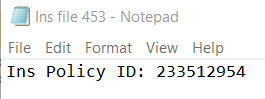
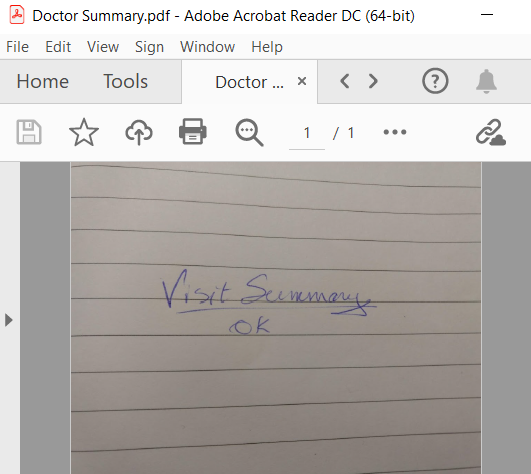
Our examples include the content MRN and Ins Policy ID, and a scanned file that must be tagged manually:Patient 6663.txt
Ins file 453.txt
Doctor Summary.pdf
- Log in to the user portal as the user you gave permissions to read and write the Files with ePHI metadata.
- Upload the files into FileCloud.
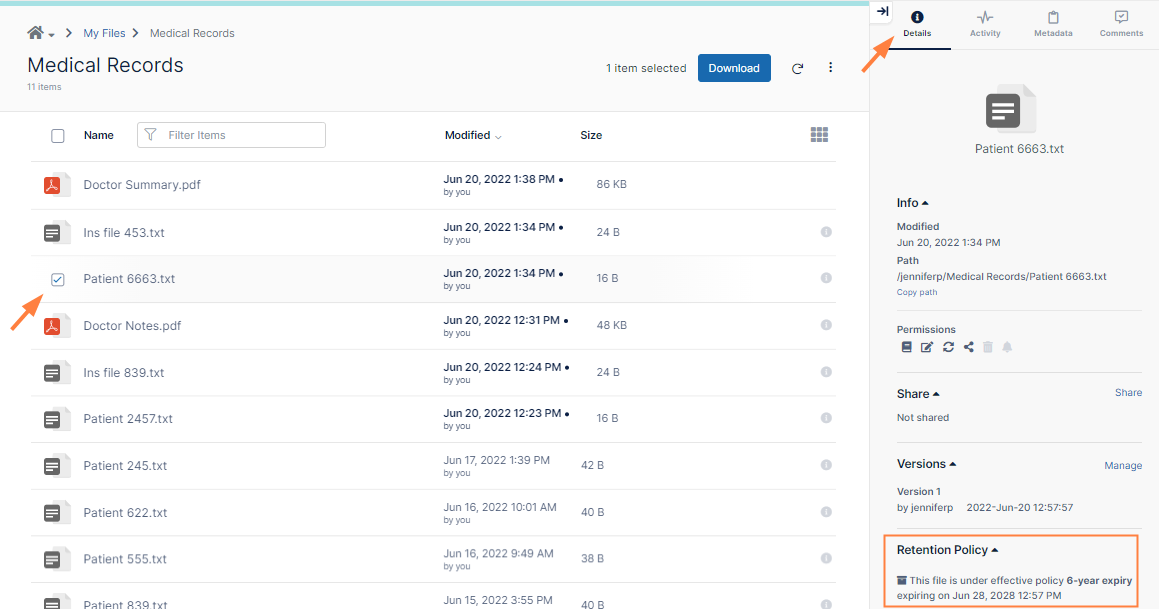
- Select the checkbox for the file Patient 6663.txt and click Details in the details pane. Confirm that the retention policy is listed at the bottom of the details.
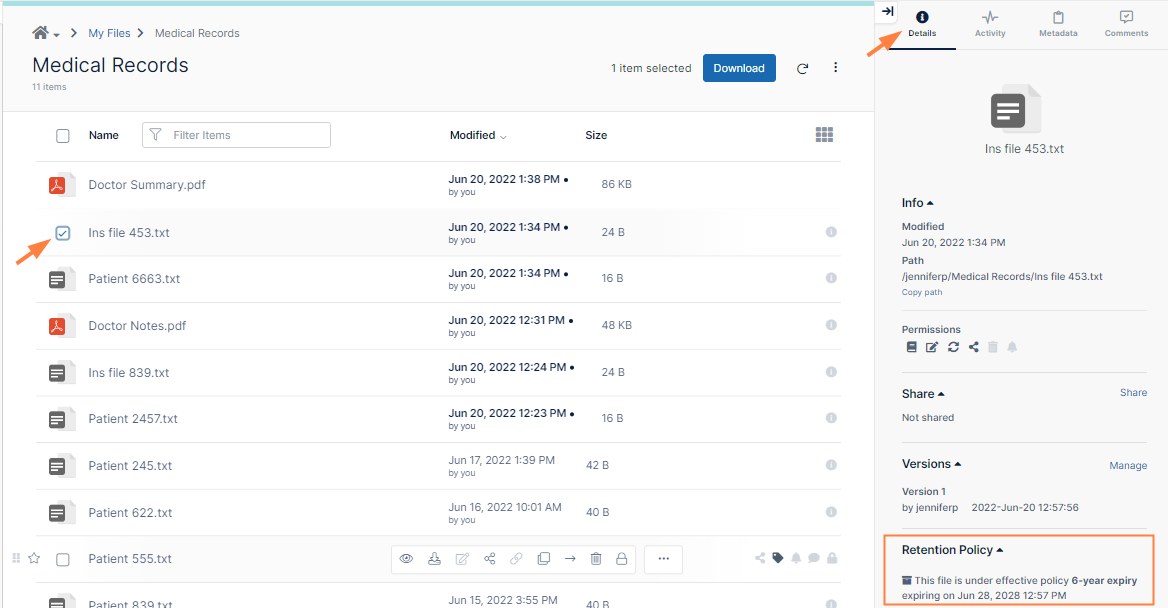
- Next select the checkbox for the file Ins file 453.txt and click Details in the details pane. Confirm that the retention policy is listed at the bottom of the details.
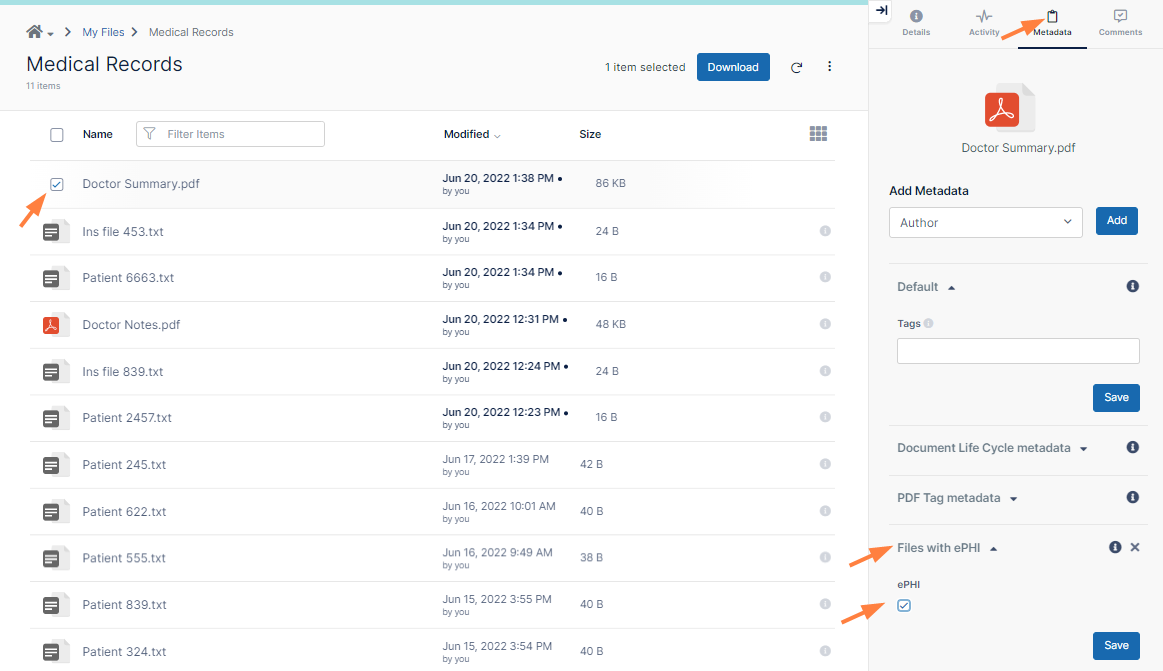
- Next, select the file Doctor Summary.pdf. It does not have a retention policy attached to it yet because you have not manually added an ePHI metadata tag yet.
- Click Metadata in the details pane.
- Follow the same steps you completed in Step 4 to add the ePHI tag to the file:
- In the Add Metadata drop-down list, choose Files with ePHI and click Add.
Files with ePHI is added to the list of included metadata. - Check ePHI to indicate that the file has ePHI.
- In the Add Metadata drop-down list, choose Files with ePHI and click Add.
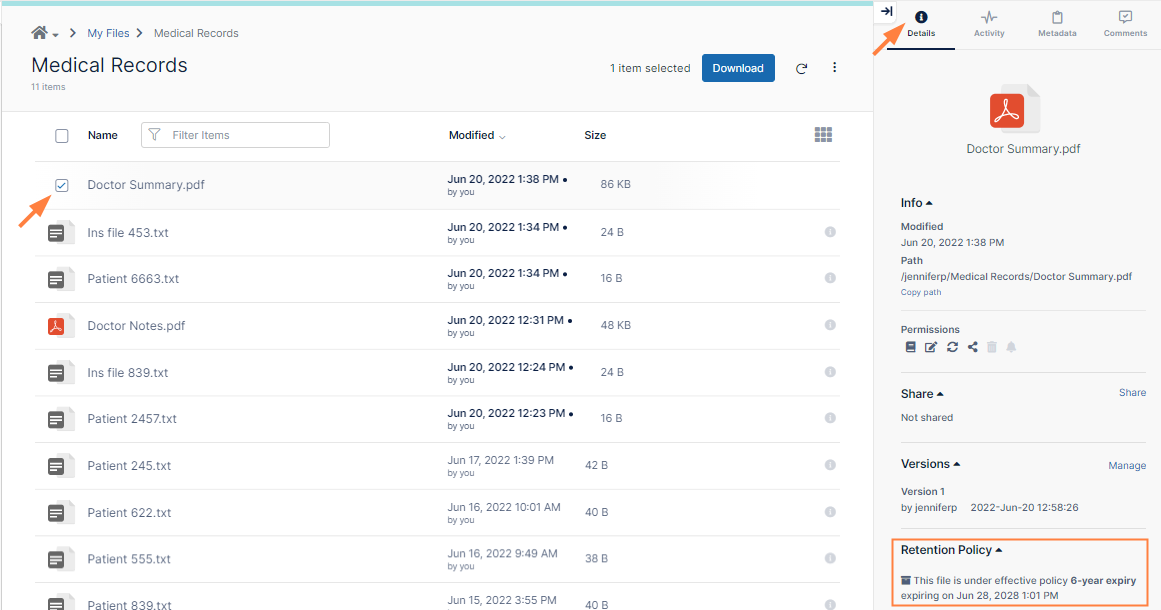
- Click the Details tab.
- Confirm that the retention policy is now listed at the bottom of the details.
Step 6: Choose the retention policy in the Compliance Center
You have now reached the last step, adding the retention policy to rules in the Compliance Center as proof that you are in compliance.
To add the retention policy to compliance rules:
- In the Admin portal's navigation panel, click Compliance Center.
The Compliance Center opens. - To go to the HIPAA Compliance page, click the HIPAA link in the menu bar.
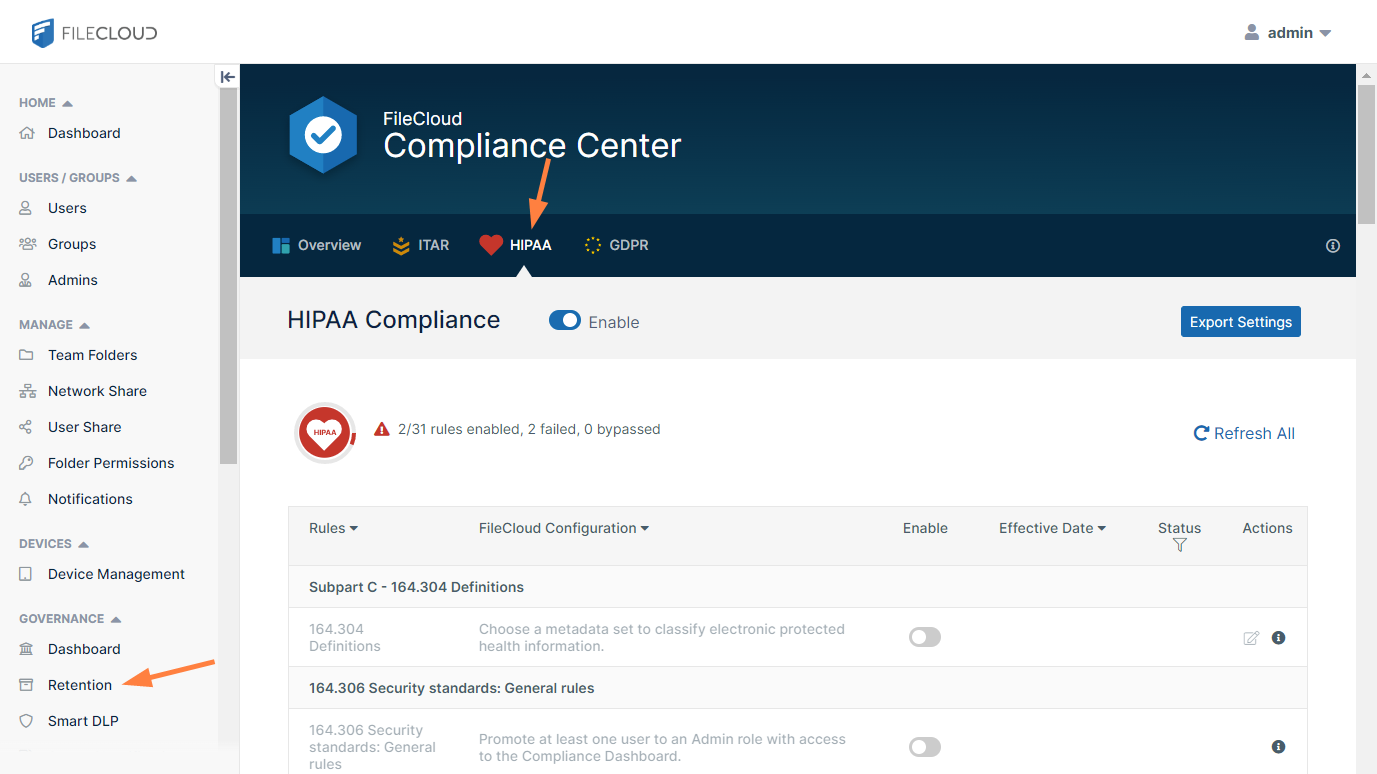
- Scroll down so you can see rules 164.312(c)(1) and 164.316(b)(2)(i).
You enabled them in Step 1, but since there were no retention policies that you could associated with them, they both fail. - Click the edit button for rule 164.312 (c) (1).
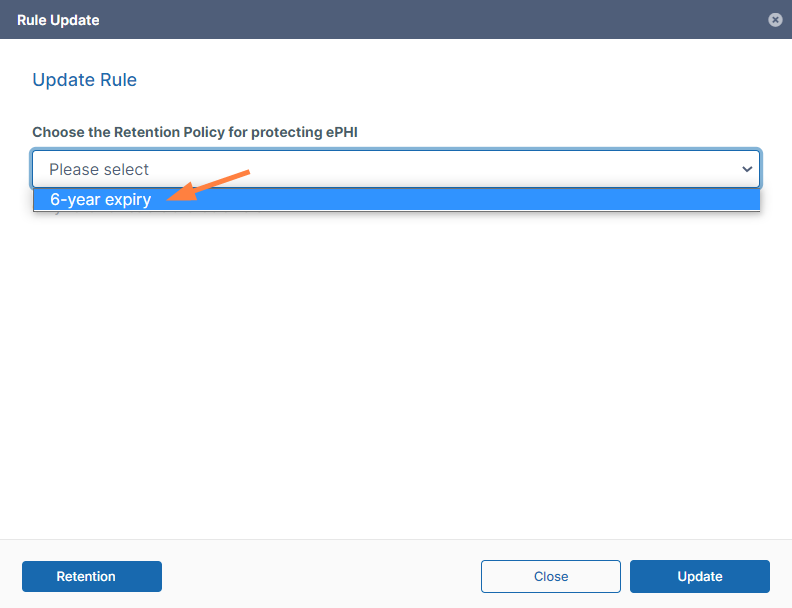
The Rule Update dialog box opens. - In the drop-down list, choose the 6-year policy that you just created.
- Click Update.
The rule now passes.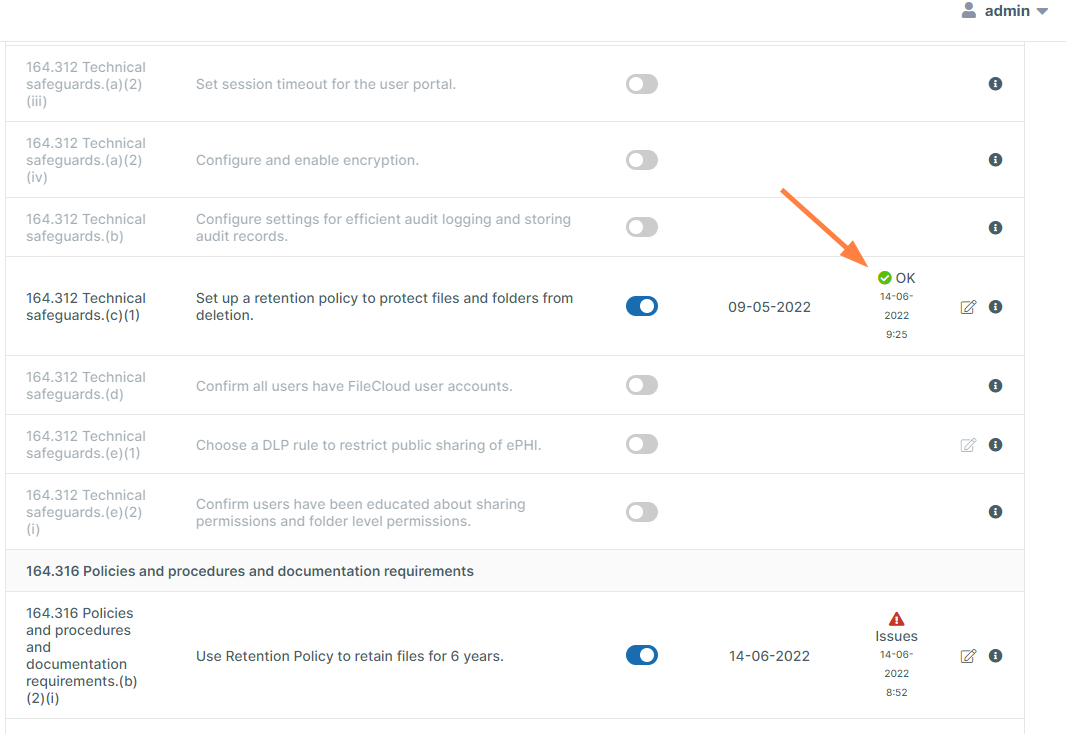
Now edit rule 164.316 (b)(2)(i), and choose the same retention policy.
Both rules now pass: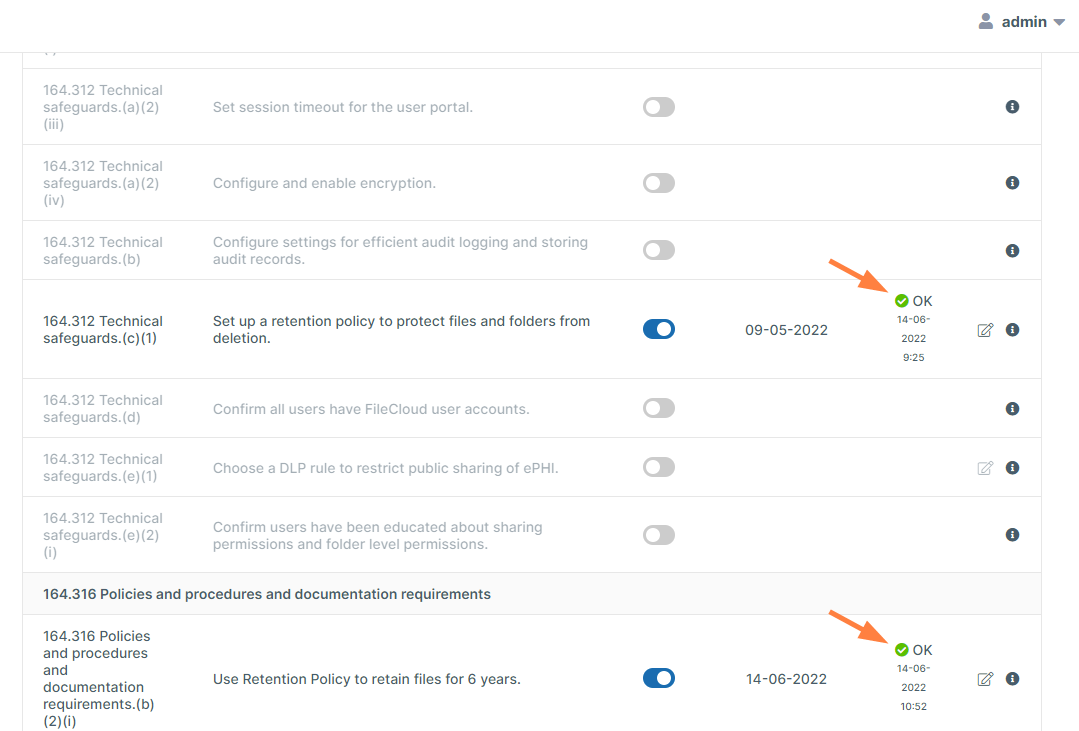
By creating and applying the 6-year retention policy and selecting it for the two requirements, you have demonstrated that you are in compliance with the two rules, which now indicate that you have passed.