Version 23.241 of FileCloud has dropped support for Shibboleth 1.3 and SAML 1.1, and updated SimpleSAML to version 2.x. If you have upgraded to FileCloud 23.241 and your FileCloud build uses SSO, follow the instructions under Configuring SSO after updating to 23.241 in Upgrade Notes for FileCloud 23.241 or Later or SSO will not work correctly in your system.
Note: As of FileCloud Version 20.3.2, to achieve high availability, you can configure FileCloud to support multiple memcache servers.
You can use SAML SSO to control the authorization and authentication of hosted user accounts that can access FileCloud Web based interface.
SAML is an XML-based open standard data format for exchanging authentication and authorization data between parties.
FileCloud supports SAML (Security Assertion Markup Language) based web browser Single Sign On (SSO) service
FileCloud acts as a Service Provider (SP) while the Customer or Partner acts as the identity provider (IdP). FileCloud SAML SSO service is based on SAML v2.0 specifications.
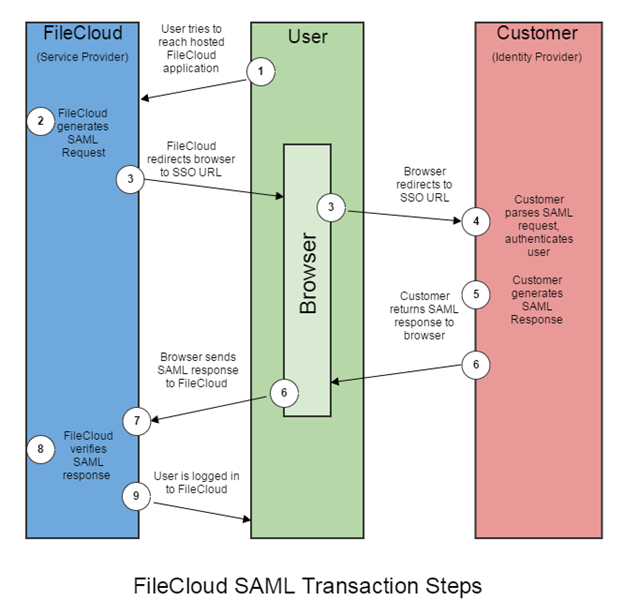
SSO Login Diagram
SSO Login Diagram
The following process explains how the user logs into a hosted FileCloud application through customer-operated SAML based SSO service.
The user attempts to reach the hosted FileCloud application through the URL.
FileCloud generates a SAML authentication request. The SAML request is embedded into the URL for the customer’s SSO Service.
FileCloud sends a redirect to the user’s browser. The redirect URL includes the SAML authentication request and is submitted to customer’s SSO Service.
The Customer’s SSO Service authenticates the user based on valid login credentials.
The customer generates a valid SAML response and returns the information to the user’s browser.
The customer SAML response is redirected to FileCloud.
The FileCloud authentication module verifies the SAML response.
If the user is successfully authenticated, the user will be successfully logged into FileCloud.
When the IdP successfully authenticates the user account, the FileCloud (SP) authentication module verifies that the user account exists in FileCloud. If the user account does not exist in FileCloud, then a new user account is created and the user is logged into FileCloud.
SSO Configuration Steps
In order to successfully configure SAML SSO, the following steps must be followed.
1. Configure Apache Webserver
Configuring the Apache server requires you to add the Alias directive to the simplesaml.php configuration file.
Pre-requisite: The mcrypt module must be installed on the FileCloud Server.
In Windows, it should be installed by default.
In Linux, if mcrypt is not installed, it must be installed
To add the Alias directive:
Use the following table to understand the typical entries in Linux and windows.
You can change these settings if the FileCloud is installed under a different WEB ROOT Folder.
Windows
Navigate to the following directory
c:\xampp\apache\conf\extra
Open the following file for editing
httpd-filecloud.conf
Add the following line at the end of the file
Alias /simplesaml "/xampp/htdocs/thirdparty/simplesaml/public"
Save the file.
Open the FileCloud Control Panel.
Use the control panel to stop and start the Webserver.
Linux
Ubuntu:
Open one of the the following files for editing:
/etc/apache2/sites-enabled/000-default.conf for HTTP (for port 80)
/etc/apache2/sites-enabled/default-ssl.conf for HTTPS (for port 443)
Add the following line within <VirtualHost *:80> for HTTP connection or <VirtualHost *.443> for HTTPS connection. You can place it under the line DocumentRoot /var/www/html.
Alias /simplesaml /var/www/html/thirdparty/simplesaml/public
To restart the apache webserver, run the following command:
service apache2 restart OR systemctl restart apache2
RHEL:
Open one of the the following files for editing: /etc/httpd/conf/httpd.conf (for port 80) /etc/httpd/conf.d/ssl.conf (for port 443)
Add the following line within <VirtualHost *:80> for HTTP connection or <VirtualHost *.443> for HTTPS connection. You can place it under the line DocumentRoot /var/www/html.
Alias /simplesaml /var/www/html/thirdparty/simplesaml/public
To restart the webserver, run the following command: service httpd restart OR systemctl restart httpd
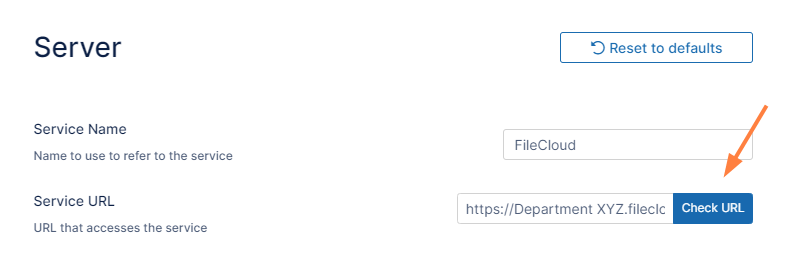
2. Ensure the correct FileCloud URL is set and uses HTTPS
In the FileCloud admin portal's left navigation bar, scroll down and clickSettings.Then, on theSettingsnavigation page, clickServer. The Serversettings page opens.
In the Server URL field, confirm that your URL begins with HTTPS.
Click Check URL to make sure your URL is valid.
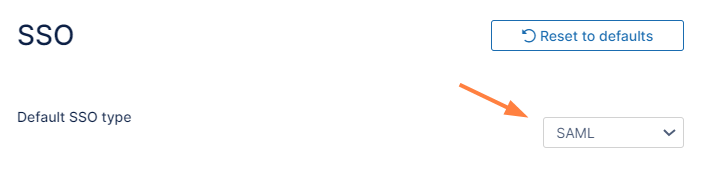
3. Set SAML as the default single sign-on method in FileCloud
To set the SSO type in FileCloud:
In the FileCloud admin portal's left navigation bar, scroll down and clickSettings.Then, on the Settings navigation page, click SSO . TheSSO page opens.
In Default SSO Type, select SAML.
4. Configure IdP settings in FileCloud
Note: If you are using Active Directory Federation Services (ADFS) Support for authentication, see ADFS Single Sign-On Support.
To configure IdP settings in FileCloud:
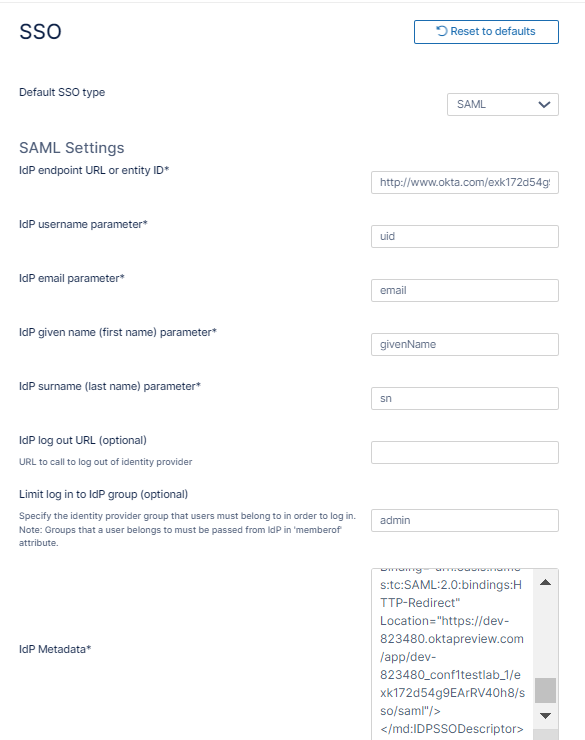
In the FileCloud admin portal SSO settings page, fill in the settings under SAML Settings.
Use the following table to understand the IdP settings.
FileCloud Parameters
IdP Settings
IdP End Point URL
Identity Provider URL
Idp Username Parameter
Identifies the Username (must be unique for each user)
Usually uid or agencyUID
Default value: uid
NOTE: The username must be unique. If username sent by Idp is in email format, the email prefix will be used for username. The email prefix in this case must be unique.
IdP Email Parameter
Identifies the email of the user (must be unique)
Default value: mail
IdP Given Name Parameter
Identifies the given name of the user
Default value: givenName
IdP Surname Parameter
Identifies the surname of the user
Default value: sn
IdP Log Out URL (Optional)
URL for logging out of IdP
Limit Logon to IdP Group
IdP Group Name
Specifying a group name means that a user can login through SAML SSO only when the Identity Provider indicates that the user belongs to the specified IdP group
The IdP must send this group name through the memberof parameter
The memberof parameter can include a comma separated value of all groups to which the user belongs
Show the IdP Logon Screen
Identifies which Logon screen the user will see:
FileCloud screen = not selected
IdP screen = selected
IdP Metadata
Identity Provider metadata in XML Format
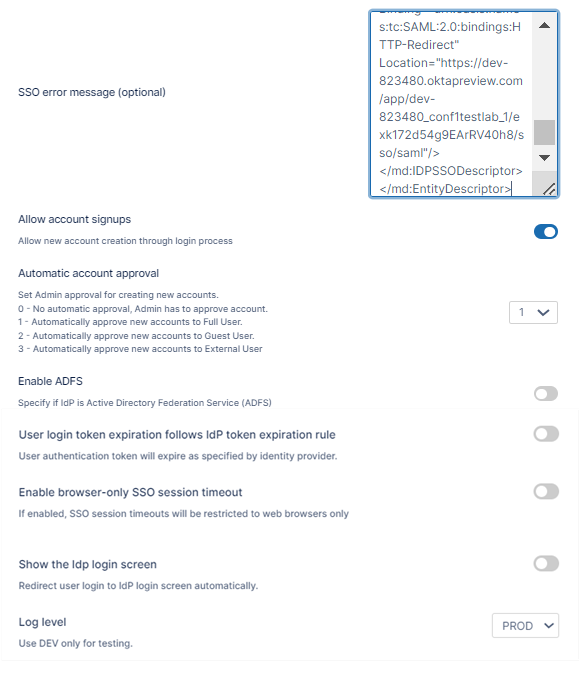
SSO Error Message (Optional)
Added in FileCloud 20.1
Custom error message that appears when a signin is invalid. Enter in HTML format.
In a multiple IDP environment, this is the error message for the default IDP. To include a message specific to each IDP, include the parameter <MESSAGE>. See Integrating Multiple IDPs for help configuring multiple IDPs with error messages specific to each one..
Allow Account Signups
Added in FileCloud 20.1
When TRUE, during the login process, if the user account does not exist, a new FileCloud user account is created automatically.
Automatic Account Approval
Added in FileCloud 20.1
This setting works with theAllow Account Signupssetting to determine:
If the account created by the user is disabled until the administrator approves it
If the account is approved with a specific level of access automatically without intervention from the Administrator.
Possible values are: 0 - No automatic approval, Admin has to approve account 1 - Automatically approve new accounts to Full User 2 - Automatically approve new accounts to Guest User 3 - Automatically approve new accounts to External User
See Integrating Multiple IDPs for help configuring multiple IDPs with automatic account approval settings specific to each one.
Enable ADFS
No
User login token expiration match Idp expiration
If enabled the user token expiration will be set based on Idp expiration settings
If not enabled user token expiration will be set based on FileCloud Session Timeout (FileCloud admin UI - Settings - Server - Session Timeout in Days)
Default: No (Not enabled)
Enable Browser-Only SSO Session Timeout
Added in FileCloud 23.232.1
If enabled, SSO session timeouts apply to browser sessions but not to client sessions.
Show the Idp Login Screen
If enabled, automatically redirect user to Idp log-in screen.
Log Level
Set the Log mode for the SAML Calls.
Default Value: prod (Do not use DEV for production systems)
5. Register FileCloud as a Service Provider (SP) with the IdP
Use the following URL (Entity ID) to register FileCloud as an SP with IdP or ADFS. The URL below also provides the metadata of the FileCloud SP:
You can customize the user log-in screen to display the SSO log-in option along with the direct log-in option or to only display the SSO log-in.
To display the SSO log-in option along with the direct log-in option:
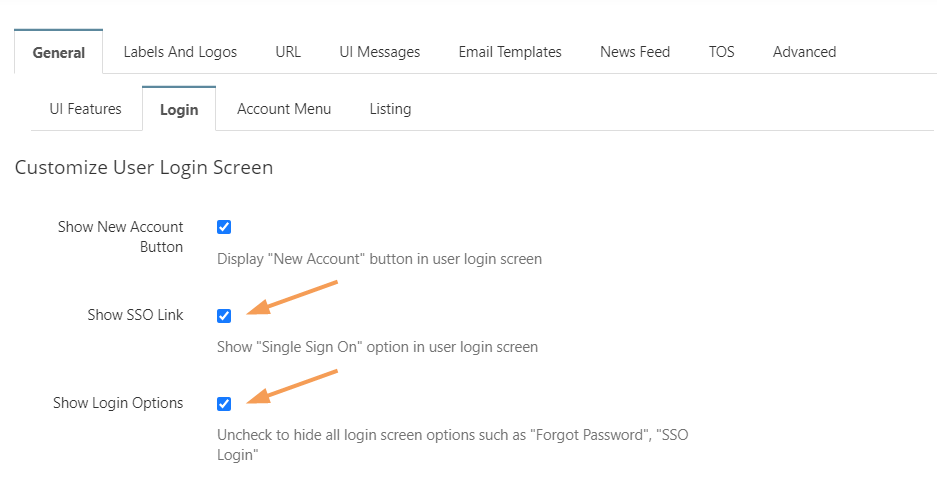
From the left navigation pane, click Customization.
Select the General tab, and then the Login sub-tab.
Check Show SSO Link and Show Login Options.
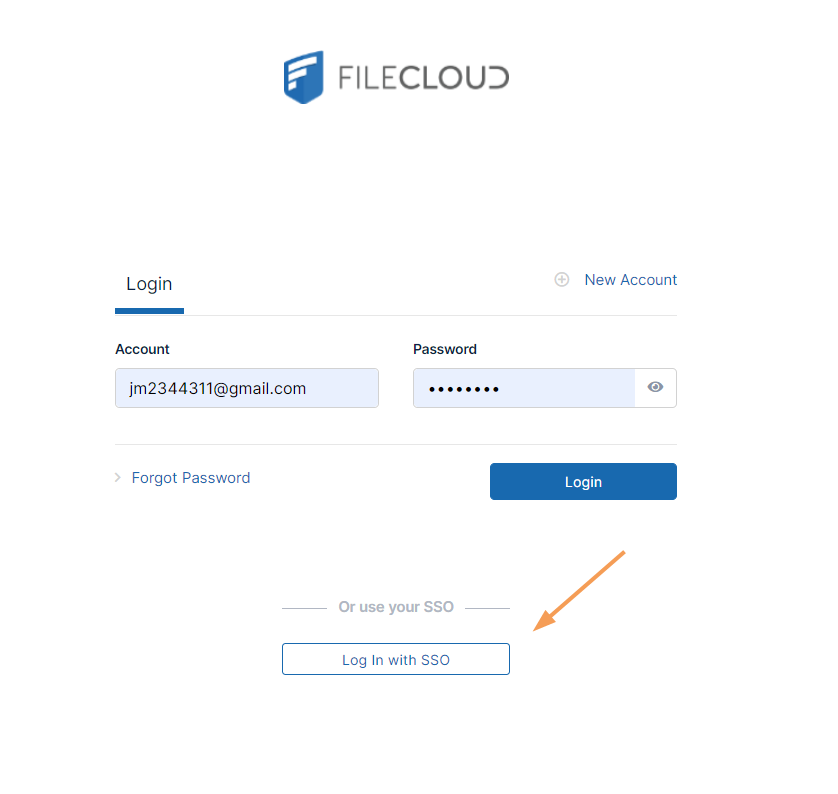
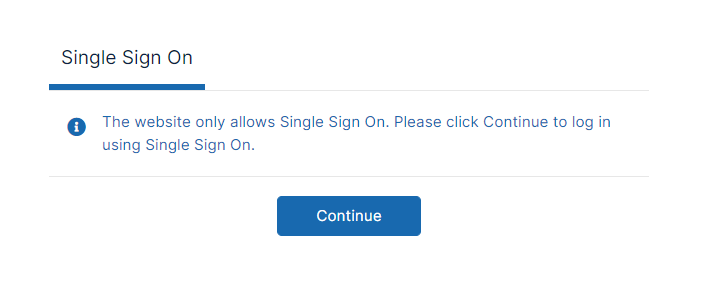
Save your changes. Now, when users access the user portal log-in page, they will see:
On clicking the Single Sign-On link on the login page, the user is redirected to the SAML SSO Service web page.
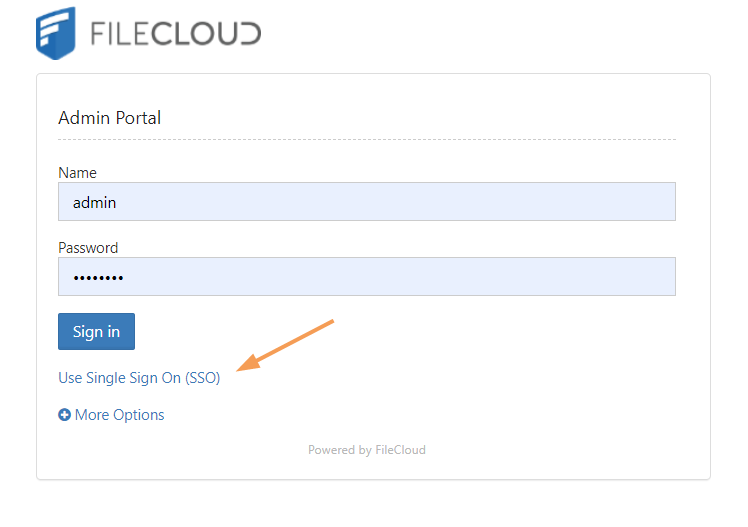
The SSO log-in option in the admin portal:
FileCloud admin interface also supports Single Sign-On.
Default admin portal log-in screen
To only display the SSO log-in option:
In order to skip the FileCloud login page and send the user directly to the SAML SSO page you must add a setting to the cloudconfig.php file, as shown below. You can configure this option for the user portal login page and the admin portal login page.
To only display the SSO log-in option in the user portal: This configuration option is available starting with FileCloud Version 19.3, It supports skipping the login page when the user accesses FileCloud with a domain name or with a full URL.
In the admin portal, go to Customization, and select the General tab, and then the Login sub-tab.
Check Show SSO Link and Show Login Options, and save your changes.
Open the configuration file: Windows: XAMPP DIRECTORY/htdocs/config/cloudconfig.php Linux: /var/www/config/cloudconfig.php
To only display the SSO log-in option:
define("TONIDOCLOUD_SSO_DIRECT_ONLY", "1");
When users enter the log-in page they will see:
To return to displaying other log-in options:
define("TONIDOCLOUD_SSO_DIRECT_ONLY", "0");
To display only SSO log-in in the admin portal:
Starting with Version 20.1, FileCloud supports skipping the login page when the admin accesses FileCloud with a domain name or with a full URL.
Open the configuration file: Windows: XAMPP DIRECTORY/htdocs/config/cloudconfig.php Linux: /var/www/config/cloudconfig.php
An earlier version of this option is also effective in versions of FileCloud prior to 20.1, but this redirect is only effective if the user specifies a domain name rather than a full URL. Instead of the above setting, use:
define("TONIDOCLOUD_SSO_DIRECT_ADMIN", "1");
7. Enable secure cookies for SimpleSAML
To enable secure cookies when using SimpleSAML to authenticate, proceed on the following.
Open the SimpleSAML configuration file: Windows: XAMPP DIRECTORY/htdocs/thirdparty\simplesaml\config\config.php Linux: /var/www/config/thirdparty/simplesaml/config/config.php
Change session.cookie.secure from FALSE to TRUE:
'session.cookie.secure' => true,
(Optional) For better cookie security set the session.cookie.samesite attribute to Strict or Lax according to the environment's needs. If the FileCloud site is embedded in an external site, it may be necessary to leave this setting null or set it to None to enable cookie sharing with the external site.
'session.cookie.samesite' => 'Strict',
8. Best Practices
Avoid Open Redirect
FileCloud may be vulnerable to an open redirect when SSO is implemented.
An open redirect is an application vulnerability that takes a parameter and redirects the user to the supplied parameter value without any validation.
This can be avoided by configuring the following setting:
Navigate to the following directory:
<FileCloud WEB ROOT>/thirdparty/simplesaml/config
Open the following file for editing:
config.php
Add the following line:
'trusted.url.domains' => array()
Restrict the Available Admin Login Resources
The FileCloud admin portal can possibly allow 2 administrative login interfaces:
One at admin API interface: /admin
One at simpleSAML admin resource: /simpleSAML.
This can be avoided by changing the log level to "PROD" in SSO settings under settings in FileCloud admin interface. This will disable the SSO admin page under simpleSAML.
The password to the SSO admin page under /simpleSAML can be changed under 'auth.adminpassword' key in <FileCloud WEB ROOT>/thirdparty/simplesaml/config/config.php
Troubleshooting
Troubleshooting
Issues that you may encounter and how to resolve them.
Issue
FileCloud is hosted behind a Proxy
Solution When FileCloud is hosted behind a proxy server, SAML will not automatically work.
Go to <FileCloud WEB ROOT>/thirdparty/simplesaml/config/filecloudconfig.php
define("TONIDOCLOUD_SAML_PROXY", "ADD PROXY INFO HERE");
Issue
System Timezone Settings
Solution
After setting SAML log level to DEV. Log file will be created under <FileCloud WEB ROOT>/thirdparty/simplesaml/log/simplesamlphp.log
SimpleSAML_Error_Exception: Error 2 - strftime(): It is not safe to rely on the system's timezone settings. You are *required* to use the date.timezone setting or the date_default_timezone_set() function.
Solution: date.timezone setting must be set explicitly in php.ini
Issue
FileCloud is hosted behing a reverse proxy
Solution
When FileCloud is hosted behind a proxy server, SAML will not automatically work.
Go to <FileCloud WEB ROOT>/thirdparty/simplesaml/config/config.php
set the base url to 'baseurlpath' => 'http(s)://YOURFILECLOUDOMAIN/simplesaml/'
where 'localhost' must be replaced with IP of memcache server as appropriate.
Issue
Autofill Username or Email on the IDP screen when configured:
TONIDOCLOUD_SAML_DOMAINS_ALLOWED
Solution
When autofill will only work when username or email address is sent through POST from the FileCloud login page to IDP. Therefore, ensure that the IDP metadata accepts requests through only POST. For example, if the Idp Metadata contains the following 2 similar lines, remove the Redirect and only have the POST